
The Role of API in Field Service Software
Discover the vital role of API in field service software, enhancing efficiency and automating workflows for seamless integration. Learn more!
June 9, 2026
Article

An API, or Application Programming Interface, is the real-time integration layer that connects your field service management (FSM) software to the CRM, ERP, inventory, and billing systems your business already runs on. The role of API in field service software goes beyond simple data transfer. It automates workflows so that when a technician marks a job complete, the CRM updates, the invoice fires, and inventory adjusts without anyone touching a keyboard. Platforms like Microsoft Dynamics 365 Field Service and vendors like Praxedo and Optsy have built their integration strategies around this principle. For field service managers running crews across HVAC, plumbing, electrical, or pest control, APIs reduce integration complexity and accelerate every process that crosses a system boundary.
How APIs enable integration between FSM and business systems
The core function of API integration in field service is two-way, real-time data exchange. Work orders, customer records, inventory counts, and billing data move between your FSM platform and connected systems without manual re-entry. Completing a job automatically updates the CRM or triggers an invoice, which removes a category of human error entirely. That single automation alone can cut billing delays from days to minutes.
Microsoft Dynamics 365 Field Service demonstrates this at enterprise scale. It supports two-way sync with ERP and financial systems, pushing real-time pricing, costs, and inventory data as work orders execute. The result is that your dispatch team and your finance team are always looking at the same numbers, not data that is hours or days out of sync.

Beyond standard APIs, webhooks play a distinct role. An API call is initiated by your system asking for data. A webhook flips that model: the connected system pushes a notification to your FSM the moment an event occurs. Webhooks provide event-driven push notifications for real-time updates, which avoids the inefficiency of constant polling. For field operations, this means a technician's status change, a parts shipment confirmation, or a customer approval can trigger downstream actions instantly.
Here is how the key integration types compare in a field service context:
| Integration type | Best use case | Update model | Setup complexity |
|---|---|---|---|
| REST API | Custom workflows, two-way sync | On-demand (pull) | Moderate to high |
| Webhook | Status alerts, event notifications | Event-driven (push) | Low to moderate |
| Pre-built connector | Standard platform pairings | Scheduled or real-time | Low |
| Middleware/iPaaS | Multi-system orchestration | Mixed | High |
The practical impact on coordination is significant. When your frontline technicians and back-office teams share live data, dispatch decisions improve, parts availability is accurate, and customer-facing updates are timely. That is the operational benefit that keeps frontline and back-office teams in sync and is the primary reason field service managers prioritize API capabilities when evaluating software.
What are the architectural patterns for FSM API implementation?
Not every integration should use the same approach. The right architecture depends on what the system needs to do and when it needs to do it.
Synchronous APIs are the right choice when your system needs an immediate answer before proceeding. Checking whether a part is in stock before dispatching a technician, verifying a customer's contract status before scheduling a premium service call, or confirming a price before generating a quote all require a direct request-response exchange. The system asks, the connected platform answers, and the workflow continues. Synchronous APIs handle inventory or contract checks where a real-time decision is required.
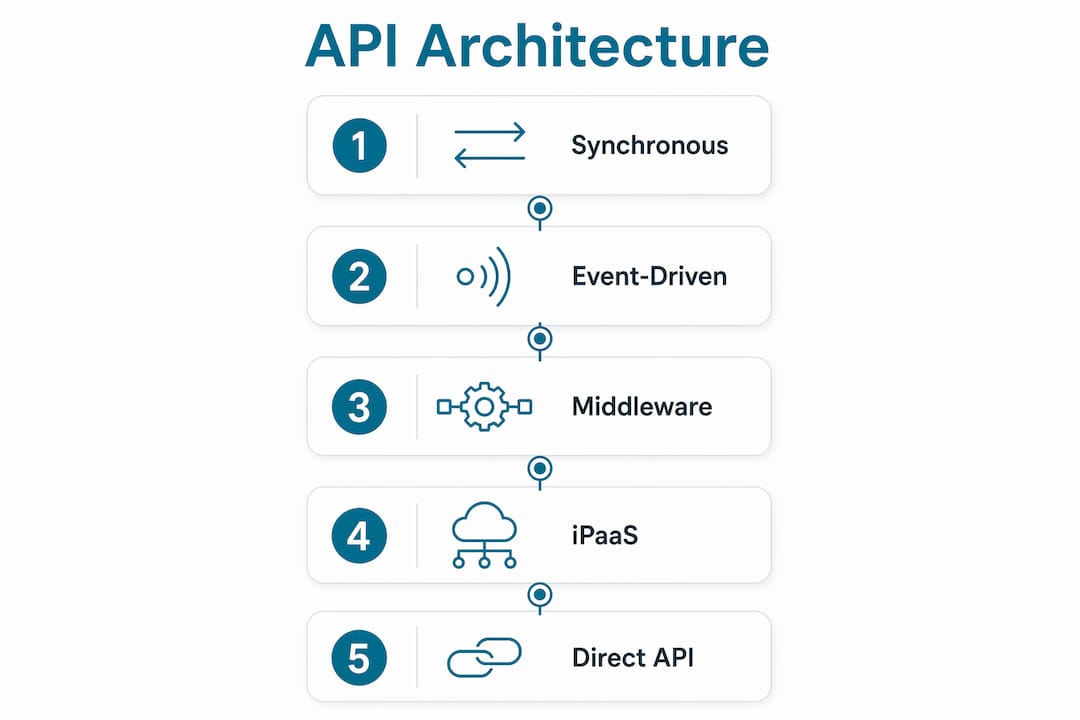
Event-driven mechanisms handle everything else. Technician location updates, job milestone notifications, and parts delivery confirmations do not need to block a workflow. They happen in the background and trigger downstream actions when they arrive. This approach reduces system coupling, meaning a delay or failure in one system does not freeze another.
Pro Tip: Design your API endpoints around business operations, not database tables. Endpoints like "create work order" or "mark job complete" stay stable through software upgrades. Endpoints that mirror internal table structures break every time the vendor updates their schema.
Three technical constraints demand attention in any FSM API implementation:
- Rate limits. Exceeding API call thresholds returns HTTP 429 responses with retry timing guidance. Build retry logic into your integration from day one, not as an afterthought.
- OAuth token expiry. Tokens typically expire every 3,600 seconds, which is one hour. Long-running field service integrations fail silently if token refresh is not proactive and secure.
- Idempotency. Safe synchronization semantics like idempotency prevent duplicated invoices or repeated work order creation when the same event is delivered more than once. This is one of the hardest problems to solve correctly in FSM integrations.
When business logic changes frequently, direct API integrations become fragile. Middleware and iPaaS platforms centralize orchestration, error handling, and data transformation, reducing the maintenance burden when one connected system changes its data model or workflow.
APIs vs. connectors: which integration approach fits your operation?
Field service managers often face a direct choice between building API integrations and using pre-built connectors. Both have a place, and the wrong choice adds cost without adding capability.
When APIs are the right choice:
- Your FSM platform connects to a custom-built CRM or proprietary ERP that has no pre-built connector available
- You need bidirectional data flow with custom field mapping, business rules, or conditional logic
- Your operation spans multiple trades or regions with different workflow requirements
- You are scaling and need an integration that grows without being rebuilt
When connectors are the right choice:
- You are connecting two mainstream platforms, such as a standard FSM tool with QuickBooks or Salesforce
- Your team lacks dedicated developer resources for ongoing API maintenance
- You need the integration live within days, not weeks
- The workflow is standard and unlikely to require customization
A hybrid strategy is often the most practical answer. Use pre-built connectors for standard platform pairings and reserve API development for the integrations where custom logic is genuinely required. This approach controls cost while preserving flexibility where it matters. Software needs differ by trade, and the integration architecture should reflect that.
Pro Tip: Before committing to a direct API build, check whether your FSM vendor offers a certified connector for your accounting or CRM platform. A connector that covers 90% of your use case is almost always faster and cheaper than a custom API integration that covers 100%.
The operational consideration that most teams underestimate is maintenance overhead. APIs require ongoing developer attention when either connected system updates. Connectors are maintained by the vendor. If your team does not have a developer who owns integrations as a defined responsibility, connectors reduce risk significantly.
Real-world field service API use cases that improve efficiency
The benefits of API in software become concrete when you look at specific workflows across field service trades.
- Automated invoicing after job completion. An HVAC technician closes a work order in the mobile app. The API pushes the completed job data to QuickBooks or Xero, generates a draft invoice with parts and labor, and emails it to the customer within seconds. No dispatcher re-enters data. No billing delay.
- Live inventory synchronization. A plumbing crew uses a part on-site and logs it in the FSM app. The API updates the warehouse inventory count in real time, triggers a reorder if stock falls below threshold, and adjusts the job cost automatically. This eliminates the end-of-week inventory reconciliation that wastes hours.
- Customer portal updates via API. Electrical contractors can give customers live job status through a branded portal. The API feeds technician location, estimated arrival, and job progress to the portal without any manual update from the office. Customer calls asking "where is the technician?" drop significantly.
- Pest control route optimization with CRM sync. When a recurring pest control customer reschedules, the API updates the CRM, adjusts the route in the scheduling engine, and notifies the technician's mobile app simultaneously. Three systems stay aligned from a single customer action.
- Mobile experience improvements. Technicians in the field get real-time updates on parts availability, customer history, and job instructions through the mobile app because the API pulls live data from connected systems. They arrive prepared, not guessing.
The real-time web application model underpins all of these use cases. APIs reduce manual work and long-term costs by letting developers connect existing services directly, which avoids repetitive custom coding for every new integration requirement.
Key takeaways
APIs are the foundational integration layer that connects FSM software to CRM, ERP, inventory, and billing systems, and choosing the right architecture determines whether your field operations scale or stall.
| Point | Details |
|---|---|
| APIs automate cross-system workflows | Job completion triggers invoicing, CRM updates, and inventory adjustments without manual re-entry. |
| Synchronous vs. event-driven design matters | Use synchronous calls for immediate decisions and webhooks for background status updates to reduce system coupling. |
| Token expiry and rate limits cause silent failures | Build proactive OAuth refresh and retry logic into every FSM API integration from the start. |
| Connectors beat APIs for standard platform pairings | Pre-built connectors for QuickBooks or Salesforce are faster and cheaper when custom logic is not required. |
| Middleware reduces maintenance when logic changes often | iPaaS platforms centralize error handling and transformation, protecting integrations through system upgrades. |
Why most FSM API strategies fail before they scale
I have reviewed integration setups across dozens of field service operations, and the pattern is consistent. Teams build a direct API connection between their FSM and their accounting platform, it works well for six months, and then the accounting vendor pushes an update that changes a field name or deprecates an endpoint. The integration breaks on a Friday afternoon, invoices stop firing, and nobody notices until Monday morning when the billing queue is backed up.
The mistake is treating the API integration as a one-time project rather than a living system. Token expiry is the most common silent killer. An integration that worked perfectly in testing fails in production because nobody built the token refresh logic, and the error surfaces as a missing invoice rather than an obvious error message.
My honest recommendation: if your operation connects more than three systems through APIs, invest in a middleware layer before you need it. The upfront cost is real, but it is far lower than the cost of rebuilding fragile point-to-point connections every time a vendor updates their platform. Platforms like MuleSoft or Zapier handle the orchestration layer, so your team focuses on the business logic, not the plumbing.
The other thing I consistently see underestimated is endpoint design. Teams build integrations that mirror database tables because that is what the developer found in the API documentation. When the vendor upgrades their database schema, every integration breaks. Design around business actions instead. "Create work order" and "post labor" are stable. "Insert into tbl_jobs" is not. This single decision determines whether your integration survives the next software upgrade.
APIs are not a feature you check off during vendor selection. They are the infrastructure that determines whether your FSM software actually connects to how your business operates.
— Blake
Find the right FSM software with the API capabilities your crew needs

Ampleexpress evaluates over 30 field service software options across HVAC, plumbing, electrical, and pest control, ranking each by API integration depth, pricing model, and rollout risk for your crew size. If you are comparing platforms and need to know which ones support the integrations your operation actually requires, the field service software by trade guide gives you a ranked shortlist with integration fit highlighted for each option. You can also explore software alternatives with API analysis to see how leading platforms compare on integration flexibility before you commit to a vendor.
FAQ
What is the role of an API in field service software?
An API connects your FSM platform to external systems like CRM, ERP, and billing tools, enabling real-time, automated data exchange. When a technician completes a job, the API can trigger an invoice and update the CRM without manual input.
How do APIs differ from connectors in field service management?
APIs offer custom, flexible two-way integrations suited for complex or unique workflows, while pre-built connectors provide faster setup for standard platform pairings like FSM to QuickBooks. Most operations benefit from using both depending on the integration's complexity.
What causes FSM API integrations to fail in production?
The most common causes are OAuth token expiry, which defaults to one hour in platforms like Oracle Field Service Cloud, and API rate limits that return HTTP 429 errors when exceeded. Both require proactive handling in the integration design.
When should a field service business use middleware instead of direct APIs?
Middleware or iPaaS platforms are the right choice when your operation connects multiple systems and business logic changes frequently. Direct API integrations have fewer dependencies but break more easily when either connected system updates its data model.
Which field service trades benefit most from API integration?
HVAC, plumbing, electrical, and pest control operations all benefit from API-driven automation, particularly for invoicing, inventory sync, and customer portal updates. The trade-specific software needs vary, but real-time data exchange improves efficiency across all of them.