
Cut HVAC Scheduling Manual Data Entry in 2026
Discover how to cut HVAC scheduling manual data entry with automation, reclaiming lost hours and boosting productivity by up to 50%.
July 21, 2026
Article

Automating HVAC scheduling and data entry is the fastest way to recover lost hours and reduce costly errors in your service operation. AI-driven automation saves over 25 hours weekly on admin tasks and increases booked jobs by 30%–50%, while automated appointment reminders cut no-shows by up to 60%. The core components that make this work are event-driven triggers, validation layers, and exception handling queues, all connected through native system integrations that eliminate double entry entirely.
- Event-driven triggers fire updates the moment a job is completed, a payment posts, or a booking is confirmed, keeping every system current without manual input.
- Validation layers catch incomplete or incorrect data before it reaches your CRM, accounting software, or dispatch board.
- Exception handling queues route flagged records to a human reviewer instead of letting bad data propagate downstream.
- Native integrations connect field capture tools directly to back-office systems, so a technician's field entry never gets retyped by office staff.
The result is a workflow where data flows once, automatically, from the field to every system that needs it.
***
What problems does manual HVAC scheduling actually cause?
Manual scheduling and data entry processes create compounding problems that grow with your job volume. Understanding where the friction lives is the first step toward fixing it.
- High transaction costs: Manual double entry costs HVAC operations up to $12–$15 per transaction and generates an average of 4.8 hours per week in administrative corrections.
- Warranty claim failures: Roughly 40% of warranty claims contain errors or missing documentation, leading to rejections and weeks of delay.
- Stale customer records: Most HVAC CRM records are incomplete or outdated because manual updates depend on whoever happens to be at the front desk, and inconsistent updates cause missed maintenance opportunities and lost upsell potential.
- Paper dependency: Field crews relying on paper forms face re-typing delays, lost documents, and no real-time visibility for dispatchers.
- Billing disputes: Human transcription errors in job notes and parts lists create invoice discrepancies that slow payment and damage customer trust.
- Scaling bottlenecks: A manual process that barely works at 30 jobs per week breaks down entirely during peak season demand spikes, when call volume and scheduling complexity both surge.
***
How to build an effective HVAC scheduling automation system
A structured rollout beats a rushed one every time. Follow these steps to move from paper-based chaos to a fully automated scheduling and data flow.
- Conduct a rekeying audit. Walk through a full workday with one of your technicians. Document every form they complete in the field and every field that gets retyped back at the office. Map the full path: tech writes on paper, paper returns to the office, someone types it into the system. Count how many people touch each record. This audit surfaces hidden administrative costs that most HVAC businesses never see on a spreadsheet.
- Rank entry points by volume and cost. Not all manual entry is equal. A work order completed 50 times per week costs far more to retype than a form used twice. Prioritize the highest-volume, highest-cost entry points first to maximize your return on investment.
- Choose mobile capture tools with native integration. The tool must write field data directly to your system of record, with no CSV exports and no manual imports. Look for native integration with your existing field service management platform, accounting software, and CRM. A mobile form that still requires a manual import step is half a fix, not a solution.
- Design event-driven workflows. Build triggers that fire on job completion, payment confirmation, or new booking. Event-driven processes update every connected system immediately, preventing the backlogs and billing delays that batch syncs create.
- Add validation and exception handling. Configure rules that flag incomplete records, missing equipment serial numbers, or mismatched job codes before data reaches your accounting or dispatch systems. Route flagged records to a human review queue rather than letting errors propagate.
- Run a two-week pilot with one technician and one job type. Pick a single form, a single tech, and run the new digital process in parallel with the old paper process. Track time saved, errors caught, and any friction before expanding.
- Scale one crew at a time. Once the pilot confirms the data flows correctly, retire the paper form for that job type and roll out to the next crew. Gradual expansion reduces resistance and gives you time to address edge cases before they become team-wide problems.
Pro Tip: Start your audit with the job type that generates the most weekly paperwork. Fixing that one process first often delivers enough time savings to fund the rest of the rollout.
***
Common mistakes to avoid when adopting HVAC scheduling automation
Most failed automation projects share the same handful of errors. Knowing them in advance keeps your rollout on track.
- Treating mobile forms as automation. A digital form that still requires a manual import into your system is digitization, not automation. True automation means field data flows directly into back-office systems with no human transcription step.
- Skipping the audit. Jumping straight to software selection without mapping your current data entry points means you fix one form and miss three others generating equal waste.
- Neglecting validation layers. Pushing unvalidated field data into your accounting or billing system creates downstream errors that cost far more to correct than they would have to prevent.
- Forgetting exception handling queues. Without a defined path for flagged or incomplete records, errors either stall the workflow or corrupt your records silently.
- Ignoring staff training. Office staff and technicians who don't understand why the process changed will revert to paper. Change management is not optional.
- Using batch syncs instead of real-time triggers. Batch processes that run nightly or hourly delay billing, leave dispatchers working with stale data, and create reconciliation headaches at month end.
- Overlooking data security. Automated workflows that move customer data between systems must comply with applicable privacy requirements. Confirm that your software vendor's data handling practices meet your state's requirements and any relevant industry standards before going live.
***
What are the measurable benefits of automating HVAC scheduling?
The operational gains from removing manual data entry are concrete and well-documented across field service operations.

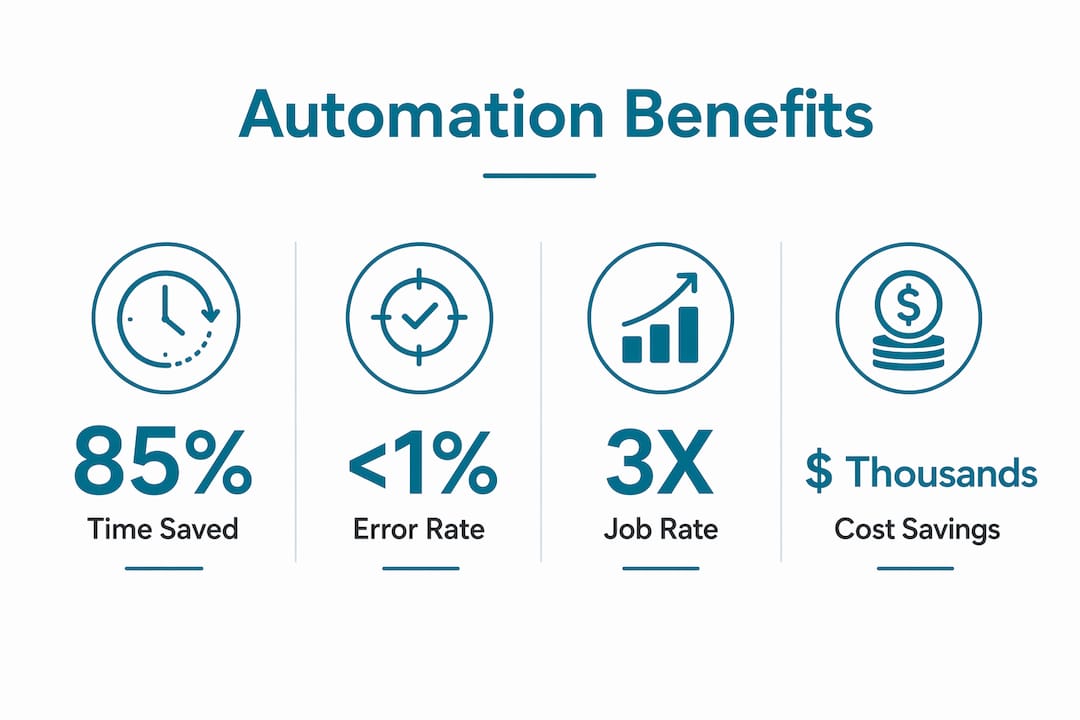
Automation can reduce manual administrative hours by up to 85%, which translates to thousands of dollars recovered annually at typical office labor rates. The 25-plus hours per week saved on admin tasks alone frees your office staff for customer-facing work and exception management rather than data transcription. Automated appointment reminders significantly reduce no-shows, directly improving revenue per scheduled day as explained in How Automated Reminders Improve Client Retention. Booked jobs increase notably when scheduling becomes faster and dispatchers work from accurate, real-time data.
Data accuracy improves sharply once human transcription is removed from the process. Near-zero error rates in job records reduce billing disputes, accelerate payment posting, and eliminate the documentation gaps that cause warranty claim rejections. Customer records updated automatically at intake, booking, and job completion give your team a complete equipment history for every account, which supports proactive maintenance outreach and accurate service agreements.
The shift in office roles is equally significant. Field service automation moves staff from manual data entry to exception management, where they intervene only when the system flags a conflict or an incomplete record. That reallocation raises the value of every hour your office team works.
***
How to select the right HVAC scheduling software for your business
Software selection is where many HVAC businesses lose time they expected to save. The right choice depends on your current systems, job volume, and crew size, not on which platform has the most features.
- Verify native integrations first. Confirm the software connects directly to your existing CRM, accounting platform, and dispatch system without requiring middleware or manual exports. Integration gaps are the most common source of continued double entry after a software purchase.
- Assess automation depth. Look for event-driven syncing, configurable validation rules, and exception handling queues. A platform that only offers scheduled batch syncs will not deliver real-time accuracy.
- Match the platform to your job volume. Entry-level field apps work well for crews running under 20 jobs per week. Enterprise platforms built for multi-location operations add overhead that smaller teams don't need and often can't manage.
- Evaluate vendor support and training resources. A platform your team won't use is worse than no platform at all. Prioritize vendors with onboarding support, accessible documentation, and responsive customer service.
- Review security and compliance features. Confirm the platform encrypts data in transit and at rest, offers role-based access controls, and maintains audit logs. For HVAC operations handling EPA Section 608 refrigerant records, verify that the software supports compliant documentation workflows.
- Pilot before committing. Run a two-week trial on one job type before signing a contract. Real-world performance on your specific workflows tells you more than any demo.
- Use independent shortlists to cut research time. Ampleexpress provides a ranked shortlist of HVAC software options matched to your crew size, pricing path, and rollout risk, so you evaluate only the platforms that fit your operation.
***
What software tools are available for automating HVAC scheduling and data entry?
The HVAC software market in 2026 covers a wide range of automation capabilities, from basic scheduling apps to fully integrated field service platforms. Two tools worth examining closely are FieldInsight and Arrivy Operations Cloud™.
FieldInsight is a field service management platform built specifically for HVAC and mechanical contractors. It connects scheduling, dispatch, job management, and invoicing in a single system, with automated workflows that trigger on job status changes. Technicians capture data in the field through a mobile app, and that data flows directly into job records, customer history, and invoicing without any re-entry. FieldInsight also supports preventive maintenance scheduling, which is particularly useful for commercial HVAC accounts with recurring service agreements.
Arrivy Operations Cloud™ focuses on the operations layer between scheduling and customer communication. It automates technician tracking, customer notifications, and job status updates, reducing the manual coordination that typically falls on dispatchers. Its event-driven notification system keeps customers informed at each stage of a job, which directly supports the no-show reduction that automated reminders deliver. Arrivy integrates with several CRM and accounting platforms, making it a practical addition to an existing tech stack rather than a full replacement.
Beyond these two, the broader market includes entry-level scheduling apps suited to small crews, mid-market platforms with built-in CRM and invoicing, and enterprise systems designed for multi-location operations. The right tier depends on your job volume, integration requirements, and budget. Platforms reviewed on Capterra and G2 carry verified user ratings that reflect real-world performance across crew sizes similar to yours.
***
How does HVAC scheduling automation integrate with your CRM and work order systems?
Integration is the mechanism that makes automation real. Without it, you have digitization, not elimination of manual entry.

The most reliable integration architecture connects your field capture tool directly to your CRM, work order system, and accounting platform through native APIs. When a technician marks a job complete in the field app, the work order closes automatically, the customer record updates with equipment notes and service history, and an invoice drafts in the accounting system, all without anyone at the office touching a keyboard. This is the event-driven model that reduces data entry time and prevents the billing backlogs that batch processes create.
CRM integration specifically solves the stale-record problem. Triggers at intake, booking, and job completion automatically update customer history, equipment details, and next-service dates. That data then drives automated maintenance reminders and service agreement renewals without manual follow-up. For HVAC businesses using calendar integration with their scheduling tools, the same event triggers can push appointment confirmations and technician assignments to shared calendars in real time.
Work order integration closes the loop between dispatch and billing. A work order created at booking carries through to the field, gets updated by the technician, and closes into an invoice automatically. No paper, no re-entry, no delay between job completion and payment request.
***
Best practices for migrating from manual logs to automated systems
Data migration is the step most HVAC businesses underestimate. Moving years of paper records and spreadsheet logs into a new system requires a clear plan, or you carry old errors into your new workflow.
Start by auditing your existing records for completeness before migrating anything. Incomplete customer records, missing equipment serial numbers, and inconsistent address formats will cause problems in an automated system just as they did in a manual one. Clean the data first, then migrate. Assign one person to own the migration process and verify records against source documents rather than copying errors from one system to another.
Migrate in phases by customer segment or job type rather than attempting a full cutover at once. Start with active accounts and current equipment records. Historical records can follow once the live data is confirmed accurate. This approach limits the blast radius if something goes wrong and keeps your team operational throughout the transition.
After migration, run parallel processes for two to four weeks. Keep your old records accessible while the new system builds its own history. This gives your team a safety net and surfaces any data gaps before you fully retire the manual process.
***
Training and change management for HVAC staff moving to automated scheduling
Technology alone does not change behavior. The teams that get the most from scheduling automation are the ones that invest in training and communicate the "why" clearly before the rollout begins.
Start with your technicians. They are the first point of data capture, and their buy-in determines whether field data is accurate. Show them specifically how the new mobile capture process saves them time, fewer callbacks, no more driving paperwork back to the office, and less time on hold with dispatch. Hands-on practice on a real job type before the full rollout removes the uncertainty that causes resistance.
Office staff need a different conversation. Their role shifts from entering data to reviewing exceptions and managing escalations. That shift can feel threatening if it is not framed correctly. Position it as an upgrade: they spend less time on repetitive entry and more time on customer calls, scheduling decisions, and problem-solving. Salesforce research on field service automation confirms that this role transition is one of the most consistent outcomes of automation adoption across field service industries.
Build a feedback loop into the first 30 days. Ask technicians and office staff what is not working, fix it quickly, and communicate the fix. Early wins build momentum. Early problems that go unaddressed build resistance.
***
Key Takeaways
Automating HVAC scheduling and data entry delivers measurable time savings, fewer errors, and higher booked job rates when built on event-driven workflows with native system integrations.
| Point | Details |
|---|---|
| Start with a rekeying audit | Map every manual data entry point before selecting software to avoid fixing only part of the problem. |
| Use event-driven triggers | Real-time triggers on job completion and booking prevent billing delays and stale records that batch syncs create. |
| Add validation and exception handling | Catch incomplete data before it reaches accounting or dispatch systems to protect record integrity. |
| Automation saves 25-plus hours weekly | AI-driven scheduling automation reduces admin time by over 25 hours per week and cuts no-shows by up to 60%. |
| Match software to your crew size | Entry-level apps fit small crews; enterprise platforms suit multi-location operations with higher job volume. |
***
Ampleexpress evaluates over 30 field service software options matched to your crew size, job volume, and existing systems, so you spend your time running jobs instead of researching vendors. Share your crew size and top priorities to get a ranked shortlist built for your HVAC operation.