
Pricing Tiers in Field Software: 2026 Decision Guide
Discover the role of pricing tiers in field software. Learn how structured pricing can enhance scalability and revenue for your business.
June 28, 2026
Article

Tiered pricing in field service software is defined as a structured model that assigns different feature sets and price points to distinct customer segments based on usage, team size, or operational complexity. The role of pricing tiers in field software goes beyond cost control. It determines which features your crew can access, how fast you can scale, and whether your software costs stay predictable as your business grows. Businesses using tiered pricing generate 44% more revenue per user compared to flat-rate models. That gap exists because tiered models align price to actual value delivered, not a single average. For field service managers running HVAC, plumbing, electrical, or pest control teams, understanding this structure is the first step toward making a software investment that holds up over time.
How do pricing tiers affect cost management in field software?
Pricing tiers directly shape your monthly budget, your feature access, and your ability to add technicians without a surprise invoice. The cost range across tiers is wide. Small teams typically pay $100–$300 per month, while enterprise deployments exceed $2,000 per month before implementation fees. That spread reflects real differences in dispatch capacity, reporting depth, customer record limits, and integration options.
The table below shows how typical field software tiers break down by team size, monthly cost, and core feature access.

| Tier | Team Size | Monthly Cost | Core Features |
|---|---|---|---|
| Entry | 1–5 techs | $100–$300 | Scheduling, basic invoicing, job history |
| Mid-market | 6–25 techs | $300–$800 | Dispatch, GPS tracking, customer portal |
| Professional | 26–75 techs | $800–$2,000 | Advanced reporting, API access, multi-location |
| Enterprise | 75+ techs | $2,000+ | Custom workflows, dedicated support, SLA terms |
Feature gating is the mechanism that makes tiers work. Entry-level plans restrict access to advanced dispatch tools or customer record volume. Mid-market plans unlock GPS tracking and customer portals. Professional tiers add API integrations and multi-location management. Each step up costs more, but it also removes a ceiling that would otherwise limit your operations.
- Budget for the tier above your current need if you expect to add 3 or more technicians within 12 months.
- Verify whether your quoted price is per user or per platform, since the billing model changes your total cost significantly.
- Ask vendors to show you the exact features locked behind each tier before signing.
Pro Tip: Request a written feature matrix from every vendor. Verbal descriptions of tier benefits are often incomplete and do not hold up when you need a specific tool six months into your contract.
What are the common field software pricing models?
Field service software uses three primary pricing models: per-user, platform plus truck, and flat-rate. Tiered pricing integrates into each of these models differently, and the model you choose affects your total cost of ownership more than the tier level alone.
| Pricing Model | How It Works | Best Fit | Tiered Pricing Role |
|---|---|---|---|
| Per-user | Cost scales with each technician added | Growing teams | Tiers add features at each user threshold |
| Platform + truck | Base platform fee plus per-vehicle charge | Fleet-heavy operations | Tiers gate dispatch and routing features |
| Flat-rate | Fixed monthly cost regardless of users | Stable, small teams | Tiers offer upgrade paths as needs grow |
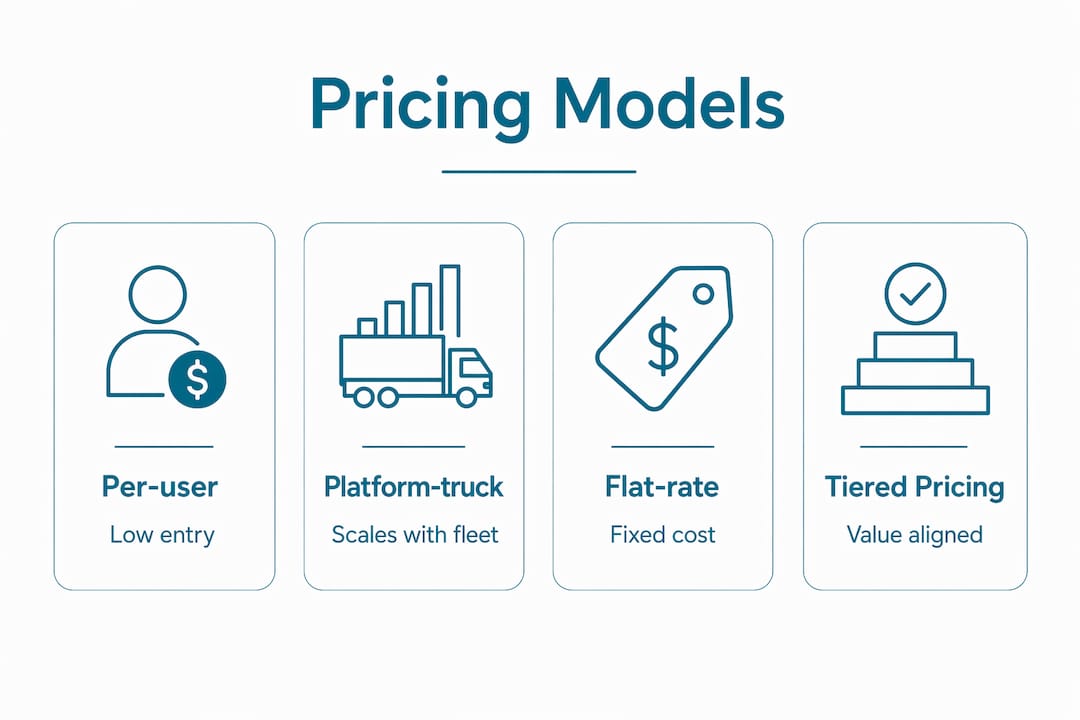
Per-user models reward small teams with low entry costs but can become expensive fast. A 10-person HVAC crew paying $49 per user per month spends $490 monthly at the base tier. Moving to a mid-market tier at $79 per user brings that to $790 before any add-ons. Platform plus truck models work differently. You pay a base fee for the software and a separate fee per vehicle, which makes cost forecasting easier for fleet managers but harder to control when you add seasonal trucks.
Tiered pricing avoids the one-size-fits-all trap by matching price to customer value and actual usage. A solo plumber does not need multi-location reporting. A 50-tech electrical contractor cannot operate without it. Tiers make that distinction explicit and price it accordingly.
The main drawback of tiered models is the jump cost. Moving from one tier to the next often means paying for features you do not yet use. Flat-rate models avoid this but offer no upgrade path. The right choice depends on how predictably your team size and feature needs will grow over the next 18–24 months. For a deeper look at how these models compare, the 2026 pricing models guide breaks down each structure with real cost examples.
How do you design effective pricing tiers for field software?
Effective tier design follows a clear structure. Experts recommend 2 to 4 pricing tiers to prevent buyer confusion and support smooth upgrades. More than four tiers creates decision paralysis. Fewer than two removes the flexibility that makes tiered pricing valuable in the first place.
The most effective tier structures share three traits:
- Each tier serves a distinct customer type. Entry tiers target solo operators or crews under five technicians. Mid-market tiers serve growing teams with dispatch and scheduling complexity. Professional and enterprise tiers address multi-location businesses with compliance and reporting requirements.
- Upgrade triggers are built into the tier design. Clear upgrade triggers tied to team growth improve tier adoption and reduce churn. A trigger might be a technician count threshold, a job volume limit, or access to a specific integration. When you hit the trigger, the upgrade feels necessary rather than arbitrary.
- Price gaps between tiers are deliberate. Setting appropriate price gaps between tiers reduces customer churn and motivates upgrades. A gap that is too small makes the premium tier feel overpriced. A gap that is too large makes the jump feel unaffordable. The mid-tier should sit close enough to the premium tier that the premium option feels like a reasonable step up.
Psychological anchoring reinforces this effect. Placing a high-priced premium tier next to the mid-tier makes the mid-tier look like the best value. Most buyers choose the middle option when the top option is visibly more expensive. Vendors use this deliberately. As a buyer, recognizing the tactic helps you evaluate whether the mid-tier actually fits your needs or just looks attractive by comparison.
Pro Tip: Map your current job volume, technician count, and top three feature needs before you evaluate any tier. Vendors design tiers to sell upgrades, not to match your actual workflow.
What hidden costs should you watch for in tiered pricing?
The quoted tier price is rarely the full cost. Implementation fees vary from $5,000 for mid-market deployments to over $100,000 for enterprise rollouts. These fees cover data migration, configuration, and training. They are often listed separately from the monthly tier price and are easy to miss in a vendor proposal.
Overage fees are the second major risk. Excessive overage fees for SMS, data, or customer records can inflate monthly bills by 20–50%. That inflation is often overlooked until the second or third invoice. A field software platform that charges per SMS notification can cost significantly more than expected if your dispatch team sends 500 messages a week.
Watch for these specific cost categories in every vendor contract:
- SMS and notification fees: Charged per message or per batch, often above a monthly threshold.
- Data storage overages: Triggered when job photos, attachments, or records exceed the tier limit.
- Customer record caps: Some entry and mid-market tiers limit the number of active customer profiles.
- API call limits: Professional integrations with accounting or CRM tools can hit call limits quickly.
- Support tier fees: Priority support is often a paid add-on, not included in the base tier price.
Downgrading is also less risky than most managers assume. Downgrading tiers often reduces costs without causing data loss, which makes it a practical option during slow seasons. Many managers avoid downgrading because they fear losing access to records or job history. In most platforms, data remains accessible even at a lower tier. Verify this in writing before you sign.
Pro Tip: Ask vendors for a sample invoice from a current customer at your target tier. Real billing data reveals overage patterns that the sales sheet will not show you.
How do you select the right tier for your field service company?
Tier selection starts with four measurable inputs: current technician count, projected growth over 18 months, the three features you cannot operate without, and your total monthly software budget including fees.
Follow these steps to evaluate your options:
- List your non-negotiable features. Dispatch, GPS tracking, invoicing, and job history are standard across most tiers. Advanced reporting, API access, and multi-location management are typically gated behind professional or enterprise tiers.
- Calculate total cost of ownership, not just the monthly rate. Add the implementation fee, divide it over your contract length, and add it to the monthly tier cost. A $300/month plan with a $6,000 implementation fee over a 24-month contract costs $550/month in real terms.
- Check the upgrade path before you commit. Confirm that moving to the next tier does not require a new contract or a full re-implementation. Some platforms treat tier upgrades as new sales, which adds cost and downtime.
- Use benchmark data to verify your quote. Regional pricing benchmarks show what comparable teams in your market pay for similar tiers. If your quote is significantly above benchmark, negotiate or request a feature-for-feature comparison.
- Run the numbers with a cost calculator. The software cost calculator from Ampleexpress estimates your total cost across tiers, including implementation and overage projections, so you can compare options before you commit.
The right tier is not always the cheapest one. It is the one that covers your current operations without paying for features you will not use for at least 12 months. Overpaying for enterprise features at a 10-person shop is as costly as underpaying for an entry plan that limits your dispatch capacity.
Key Takeaways
The most effective approach to pricing tiers in field software is to match your tier to your current crew size and feature needs, then plan your upgrade path before you sign a contract.
| Point | Details |
|---|---|
| Tiers drive revenue and value | Tiered pricing generates 44% more revenue per user than flat-rate models by aligning cost to actual usage. |
| Hidden costs inflate real spend | Implementation fees and overage charges can add 20–50% to your quoted monthly tier cost. |
| Two to four tiers is the standard | More than four tiers creates buyer confusion; fewer than two removes upgrade flexibility. |
| Downgrading is a valid option | Moving to a lower tier during slow seasons rarely causes data loss and can reduce costs significantly. |
| Total cost of ownership matters | Divide implementation fees over your contract length and add them to the monthly rate before comparing tiers. |
Why I think most field service managers pick the wrong tier
Field service managers consistently over-tier on their first software purchase. I have seen 8-person plumbing crews paying for enterprise dispatch features they will not use for three years, while their actual pain point is a basic invoicing gap that any mid-market plan solves for a third of the price.
The mistake is not ignorance. It is that vendor demos are designed to show you the most impressive version of the product, which is always the top tier. You walk out of a demo wanting features you did not know existed an hour earlier. That is the anchor effect working exactly as intended.
The more useful question is not "what does the top tier offer?" but "what does my crew actually need to close jobs faster and get paid on time?" Those two questions lead to very different purchasing decisions. Most field service teams need solid dispatch, clean invoicing, and reliable job history. Those features exist at the mid-market tier in almost every platform.
My advice: run your current workflow against the entry and mid-market tiers first. If you hit a wall, you will know exactly which feature is missing and why the upgrade is worth the cost. That is a much stronger negotiating position than buying the enterprise tier because the demo looked good. Review your tier every 12 months as your crew grows. The tier that fit a 6-person team will not fit a 20-person team, and staying on the wrong tier costs you more than the upgrade would have.
— Blake
How Ampleexpress helps you find the right tier
Choosing a tier is easier when you have independent data behind the decision. Ampleexpress evaluates over 30 field service software options across HVAC, plumbing, electrical, and pest control sectors, ranking each by pricing path, rollout risk, and fit for your crew size.

The platform highlights which tiers include hidden fees, which platforms penalize downgrades, and which options offer the clearest upgrade paths for growing teams. You can use the field service software finder to filter by trade and crew size, or run your numbers through the cost calculator to see your real total cost before you commit. Share your crew size and top three feature priorities, and Ampleexpress returns a ranked shortlist built around your actual operation.
FAQ
What is tiered pricing in field service software?
Tiered pricing is a model that offers different feature sets and price points based on team size, usage volume, or operational complexity. It replaces flat-rate pricing with structured options that scale with your business.
How much does field service software cost by tier?
Small teams typically pay $100–$300 per month, mid-market teams pay $300–$800, and enterprise deployments exceed $2,000 per month before implementation fees.
How many pricing tiers should a field software platform offer?
Two to four tiers is the recommended range, according to Stripe's SaaS pricing research. More than four tiers creates decision paralysis and slows purchasing decisions.
Can I downgrade my field software tier without losing data?
Downgrading tiers typically does not cause data loss and can reduce costs during slow seasons. Confirm data retention terms in writing before signing your contract.
What hidden costs should I watch for in tiered pricing?
Implementation fees range from $5,000 to over $100,000 depending on tier, and overage fees for SMS, storage, or customer records can add 20–50% to your monthly bill.
Recommended
- Pest Control field service software
- Get a Pest Control software shortlist
- Field Service Platform Pricing Models: 2026 Guide
- Field Service Software Cost Calculator (2026) | Ample Express
- Software Pricing Benchmarks for Service Businesses (2026)
- Field Service Software Pricing Transparency Index 2026 | Ample Express