
Why Service Business Software Needs Differ by Trade
Discover why service business software needs differ across trades. Learn how the right tools can enhance efficiency and drive growth.
June 3, 2026
Article

Service business software needs differ because no two service operations share the same delivery model, billing structure, or field reality. A consulting firm tracking billable hours against project milestones has nothing in common with an HVAC crew dispatching technicians to emergency calls across three counties. Yet both are "service businesses," and both are routinely sold the same generic platforms. Tools like Professional Services Automation (PSA) software, Enterprise Resource Planning (ERP) systems, and field service management platforms each solve a distinct slice of the problem. Understanding which slice matches your operation is the difference between software that accelerates growth and software that creates expensive workarounds.
Why service business software needs differ across operations
The core reason service software requirements vary is that service delivery itself varies. A consulting firm runs on client engagements, approval chains, and milestone billing. A pest control operator runs on recurring route schedules, chemical inventory, and same-day invoicing. These are structurally different businesses, and software built for one typically solves only a part of the other's operations, forcing workarounds in the gaps.
Billing complexity alone creates enormous divergence. Consider the range a single mid-sized service firm might use: hourly rates for consulting, fixed-fee milestones for project delivery, retainers for ongoing support, and recurring subscriptions for managed services. Generic platforms handle one or two of these models cleanly. The rest require manual adjustments, spreadsheet patches, or a second tool entirely.

Scheduling and resource allocation add another layer. Office-based service firms need calendar-driven project staffing. Field service companies need real-time dispatch, GPS tracking, and the ability to reassign jobs mid-day when a technician calls out sick. These are not variations of the same feature. They are fundamentally different systems.
Key operational factors that drive distinct software requirements include:
- Workflow flexibility: Client engagement workflows require custom approval stages, status updates, and client-facing visibility that generic task managers do not support.
- Field data capture: Technicians need to log job notes, photos, parts used, and signatures on-site, often without a reliable internet connection.
- Billing triggers: Field service billing fires at job completion. Project billing fires at milestone approval. Retainer billing fires on a calendar. Each requires a different system logic.
- Client collaboration: Agencies and consultancies need client portals. HVAC and plumbing companies need customer notification systems. These are different products.
Pro Tip: Before evaluating any software, map your actual billing triggers and field data capture points on paper. If a platform cannot handle both without a workaround, it is not the right fit regardless of price.
How do PSA, ERP, and field service software differ?
These three software categories are the most commonly confused in service business software comparison discussions, and the confusion is expensive.
| Category | Core users | Primary workflows | Billing model | Best operational fit |
|---|---|---|---|---|
| PSA (Professional Services Automation) | Consultants, agencies, IT firms | Project tracking, time entry, resource planning | Hourly, milestone, retainer | Project-based service delivery |
| ERP (Enterprise Resource Planning) | Finance, operations, procurement | General ledger, inventory, payroll | Product-centric invoicing | Product manufacturers, distributors |
| FSM (Field Service Management) | Field technicians, dispatchers | Dispatch, mobile job capture, route optimization | Job completion billing | Mobile field operations |
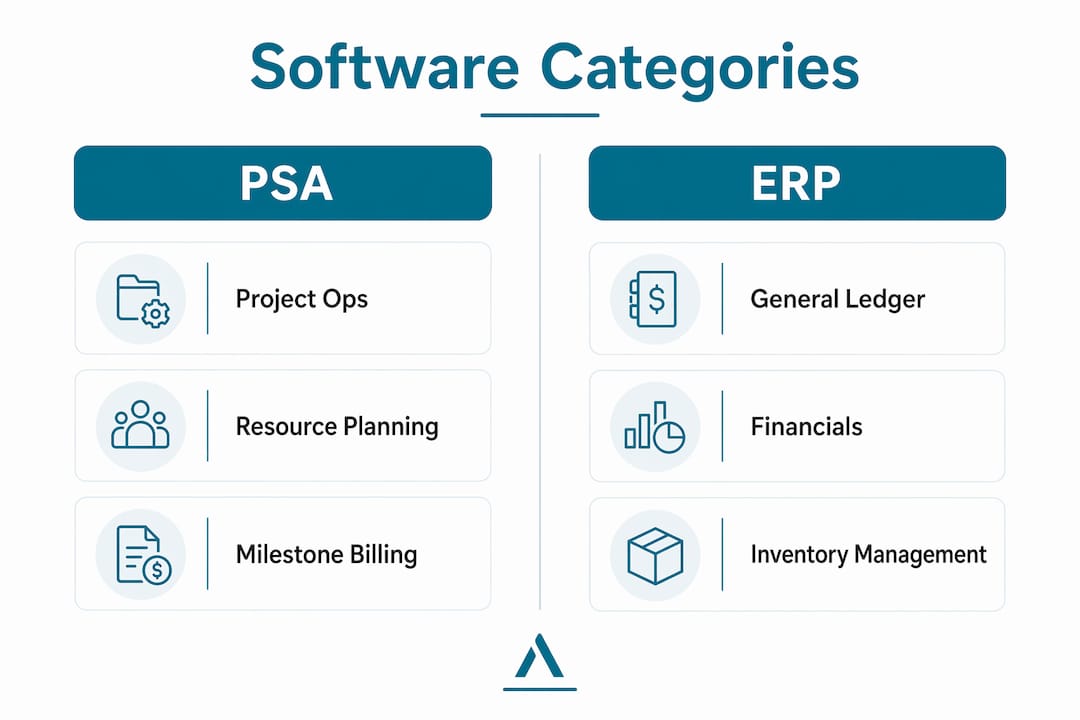
PSA software manages project operations and billing for service delivery, while ERP manages the general ledger and financials. Using one for the other's role creates workflow mismatches and reconciliation overhead that compounds as the business scales. A consulting firm that forces its PSA to handle inventory management will hit a wall. A manufacturing firm that tries to run field dispatch through its ERP will create billing delays.
Field service management software occupies a third category entirely. ERPs assume office-based next-day entry and stable connectivity, which makes them structurally unsuitable for mobile field operations requiring offline capture and instantaneous billing. Field service platforms are built for the truck, not the back office.
The revenue risk is real. Unbilled work can cause 3 to 7% annual revenue loss when field realities are not captured at the point of service. That figure represents a significant margin hit for any contractor running on tight project budgets.
Pro Tip: Many service firms keep ERP for financial accounting and layer a PSA or FSM tool on top for operational workflows. This avoids the rip-and-replace trap while giving each system the job it was designed to do.
Why generic business software fails service companies
Generic business software is built for the broadest possible market, which means it is optimized for no specific market. For service businesses, this creates four predictable failure points.
- Missing flexible billing. Generic platforms handle simple invoicing. They do not handle hybrid billing models where a single client might be billed hourly for support, on a milestone for a project, and on a retainer for ongoing access. Service firms end up managing the difference in spreadsheets.
- No service scheduling logic. Calendar tools and generic project managers do not account for technician certifications, travel time, parts availability, or emergency reprioritization. Dispatchers end up doing manually what the software should handle automatically.
- Weak client engagement features. Service businesses live and die by client relationships. Generic CRMs track contacts and deals. They do not track project status, deliverable approvals, or field job history in a way clients can access directly.
- Data silos and manual reconciliation. Most service businesses end up using multiple disconnected tools, which causes delayed reporting, inaccurate insights, and operational friction. When your dispatch tool does not talk to your billing tool, someone on your team is manually transferring data between them every day.
The scaling problem is the most damaging. At five employees, manual workarounds are annoying. At twenty-five employees, they become a structural bottleneck. Generic software oversimplifies service workflows, leading to errors and inefficiency that grow proportionally with headcount. The firms that feel this pain most acutely are the ones that adopted a generic platform early and then outgrew it without realizing it.
How software requirements and customization affect fit
Software requirements analysis is the formal process of specifying what a system must do before selecting or building it. Requirements define capabilities, behaviors, and constraints that guide architecture, design, and testing. For service businesses, skipping this step is the single most common reason a software rollout fails.
The practical version of requirements analysis for a service business owner looks like this:
- Functional requirements: What must the software do? Capture job photos, generate invoices on job close, track technician location, allow client sign-off.
- Business requirements: What outcomes must it support? Reduce unbilled jobs to zero, cut invoice-to-payment time by 30%, give dispatchers real-time crew visibility.
- Stakeholder requirements: Who uses it and how? Technicians on mobile, dispatchers on desktop, clients via portal, accountants via export.
- Integration requirements: What must it connect to? QuickBooks, Google Calendar, your existing CRM, your parts supplier catalog.
Custom Operating Systems represent the next evolution in tailored software for service industries. Custom Operating Systems let service firms configure data models, workflows, and client portals without engineering resources. Platforms like Noloco allow a service business to build the exact operational layer it needs on top of existing data, covering the edge cases that off-the-shelf tools ignore.
The critical insight here is that real operational edge cases live in delivery models, not in spreadsheets or generic systems. A pest control company that runs both residential recurring routes and commercial one-time treatments has two fundamentally different billing and scheduling models inside one business. No single off-the-shelf platform handles both cleanly without configuration.
What practical strategies help you choose the right software?
The starting point for any service software needs analysis is an honest assessment of where your complexity actually lives. Ask yourself: is your business more operationally complex or financially complex?
- High operational complexity, lower financial complexity: Field service companies, HVAC, plumbing, electrical, and pest control operators. The right stack is typically an FSM platform paired with a simpler accounting tool like QuickBooks. Field companies benefit from FSM software with mobile and offline support paired with simpler accounting software for financials.
- High operational and financial complexity: Large consulting firms, managed service providers, engineering firms. The right stack is often a PSA layered over an existing ERP, not a full replacement of either.
- Project-based with moderate financial complexity: Agencies, IT service firms, professional services teams. A standalone PSA with accounting integrations typically covers the full need without ERP overhead.
Choosing the right software depends on operational vs financial complexity, and many service firms use PSA plus accounting tools instead of full ERP. This reduces cost, cuts implementation time, and fits actual service delivery needs more precisely.
When evaluating vendors, test demo scenarios drawn from your actual workflows, not the vendor's scripted walkthrough. A 2026 evaluation of field service software across more than 85 vendors confirmed that demo evaluations based on realistic workflows are the most reliable predictor of post-implementation fit. That means bringing your messiest, most edge-case scenario to the demo, not your cleanest job.
Use the contractor software checklist from Ampleexpress to structure your evaluation before you talk to a single vendor. It prevents the common mistake of letting a polished demo substitute for a real requirements match.
Pro Tip: Watch for the "too early" and "too late" adoption traps. Adopting FSM software before you have consistent job volume creates overhead with no return. Waiting until you have 15 technicians and no system creates a painful forced migration. The right timing is usually when scheduling conflicts and missed billing become weekly problems.
Key takeaways
Service business software needs differ because operational complexity, billing models, and delivery workflows vary too widely for any single platform to serve all service firms equally.
| Point | Details |
|---|---|
| Delivery model drives software fit | Match your software category to your actual workflow: FSM for field ops, PSA for project services, ERP for financial complexity. |
| Generic platforms create silos | Disconnected tools cause manual reconciliation, delayed reporting, and billing errors that compound as you scale. |
| Requirements analysis prevents mismatch | Define functional, business, stakeholder, and integration requirements before evaluating any vendor. |
| Unbilled work is a measurable risk | Missing field billing capture can cost 3 to 7% of annual revenue, making FSM selection a financial decision, not just an operational one. |
| Configurable systems close the gaps | Custom Operating Systems let service firms configure workflows and portals without engineering, covering edge cases off-the-shelf tools miss. |
What I've learned from watching service firms pick the wrong software
I have seen the same mistake repeated across dozens of service businesses: they buy software based on feature lists instead of workflow fit. A plumbing company selects a PSA because it has great project tracking, then spends six months trying to make it dispatch technicians. An IT consulting firm buys an FSM platform because it has a slick mobile app, then discovers it cannot handle milestone billing or client approval workflows.
The firms that get this right share one habit. They start with a written description of their worst operational week, not their average week. They ask: what breaks, what gets missed, what requires a phone call that should not require one? That description becomes the filter for every software demo they sit through.
Rigid platforms, whether PSA or ERP, are built around assumptions about how service delivery works. Those assumptions fit some businesses and miss others entirely. The shift toward configurable systems is not a trend. It is a correction. Service businesses have always had unique operational DNA. The software market is finally catching up.
My advice: do not let a vendor's category label tell you what your business needs. Assess your own complexity first, then find the platform that fits it. If no off-the-shelf tool fits cleanly, a configurable layer on top of your existing tools is often faster and cheaper than a full platform replacement. AI automation integration is also making it easier to connect specialized tools without building custom code, which changes the calculus on layered stacks significantly.
— Blake
Find field service software matched to your trade
If you run an HVAC, plumbing, electrical, or pest control operation, the software decision is too consequential to make based on a vendor's demo alone. Ampleexpress evaluates over 30 field service software options ranked by crew size, pricing path, rollout risk, and operational fit for your specific trade. The platform is independent, which means the shortlist reflects your needs, not a vendor's commission.

Share your crew size and top operational priorities with Ampleexpress and receive a ranked shortlist built around your actual workflows. Whether you need mobile offline capture for field technicians or dispatch tools for a growing crew, the right fit exists. You just need to find it without wasting months on the wrong demo cycle.
FAQ
Why do service business software needs differ from product businesses?
Service businesses bill for time, expertise, and outcomes rather than physical goods, which requires software built around project tracking, scheduling, and client engagement rather than inventory and order management. The delivery model determines the software category.
What is the difference between PSA and field service management software?
PSA software is designed for project-based service delivery, covering time tracking, resource planning, and milestone billing. Field service management software is built for mobile field operations, handling dispatch, offline job capture, and point-of-completion billing.
How do I know if my service business needs ERP?
ERP is justified when financial complexity, such as multi-entity accounting, complex payroll, or inventory management, exceeds what a standalone accounting tool can handle. Most field service companies and small-to-mid consulting firms do not need full ERP and are better served by a PSA or FSM platform paired with QuickBooks or a similar tool.
What causes the most revenue loss in field service businesses?
Unbilled work from missed field capture is the primary culprit, with revenue loss reaching 3 to 7% annually when technicians cannot log completed work at the point of service. FSM software with offline mobile capability directly addresses this gap.
How should I evaluate service software before buying?
Run your most complex, edge-case workflow through the demo, not the vendor's scripted scenario. Use a structured software selection checklist to verify that billing models, scheduling logic, and integration requirements are all met before committing to a platform.
Recommended
- Pest Control Field Service Software
- Get a Pest Control Software Shortlist
- Field Service Software by Trade (2026): HVAC, Plumbing, Electrical & Pest
- Best Electrical software for electrical companies with service contracts
- Software Pricing Benchmarks for Service Businesses (2026)
- Contractor Software Selection Checklist for 2026 | Ample Express