
Why Contractors Need Software Solutions in 2026
Discover why contractors need software solutions in 2026. Enhance efficiency, streamline operations, and stay competitive in a challenging market.
June 10, 2026
Article

Contractor software solutions are integrated platforms that unify scheduling, dispatch, CRM, estimating, invoicing, and mobile field tools into a single operational system. Understanding why contractors need software solutions is no longer a strategic question. It is an operational necessity. About 70% of specialty contractors now use field service management software, and businesses routinely operate four to six platforms to manage core functions. That shift reflects a market where labor shortages, cost pressures, and rising customer expectations have made manual workflows a direct threat to margins. Tools like ServiceTitan, Autodesk Build, and Jobber are no longer differentiators. They are the baseline.
Why contractors need software solutions: the efficiency case
The clearest argument for adopting contractor management software is the elimination of redundant manual work. When scheduling, dispatch, and billing live in separate spreadsheets or disconnected apps, your office team re-enters the same data multiple times per job. That repetition creates errors, delays invoicing, and slows communication between the office and the field.
Centralized platforms solve this by treating every job as a single data record that flows from estimate to dispatch to invoice without manual handoffs. Nearly 30% of construction firms still rely on manual processes, and the operational gap between those firms and software-enabled competitors widens with every project added to the backlog. For a five-technician plumbing crew, that gap shows up as missed follow-ups, double-booked slots, and invoices that go out three days late.

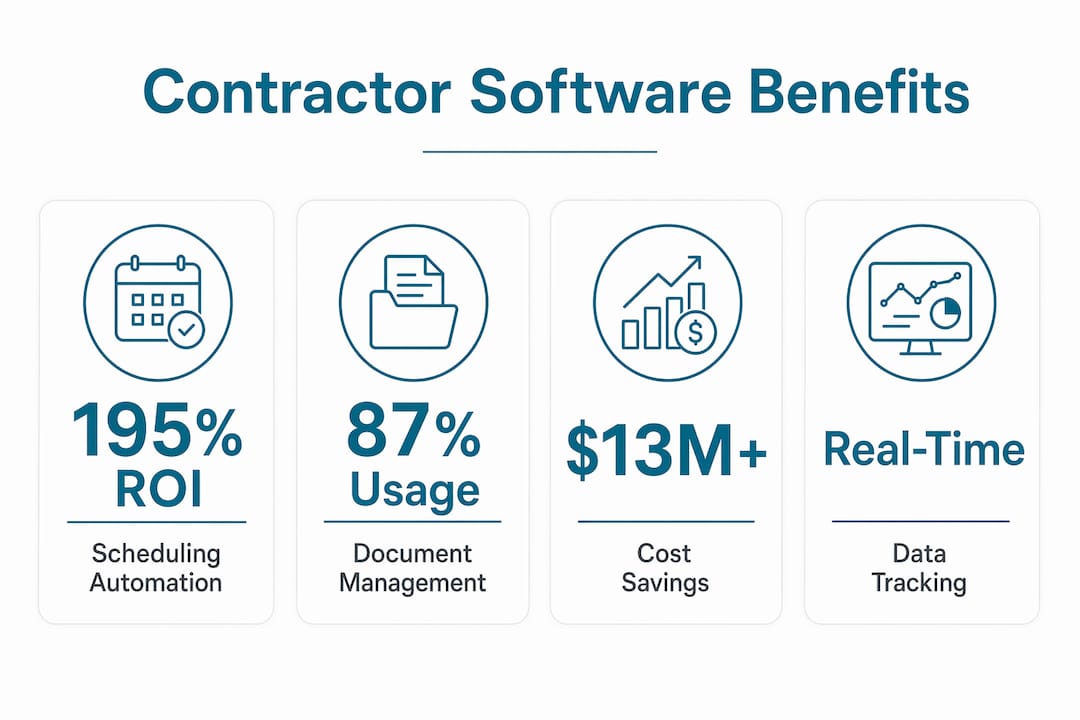
The ROI data on scheduling automation is specific and hard to ignore. Scheduling automation handled over 50% of scheduling requirements in documented field service deployments, producing a 195% ROI over three years with total benefits of $13.2 million against $4.5 million in costs. That result comes from a straightforward mechanism: when dispatchers stop manually coordinating routes and technicians stop waiting for phone confirmations, more jobs get completed per day.
Here is what software-driven efficiency looks like in practice for a field service contractor:
- Automated dispatch assigns the nearest qualified technician based on location, skill set, and availability, cutting average response time per call.
- Mobile job updates push real-time status changes to the office without requiring a phone call, freeing dispatchers for higher-value coordination.
- Integrated billing triggers an invoice the moment a technician marks a job complete, reducing the billing cycle from days to minutes.
- Customer notifications send automated appointment reminders, cutting no-shows without any manual effort from your team.
Pro Tip: Before selecting any platform, map your three biggest time drains in a typical work week. Software that directly targets those bottlenecks will deliver faster payback than a feature-rich tool that solves problems you do not have.
How integration and centralized data protect your margins
Operational efficiency and cost control are connected through one mechanism: data centralization. When your field activity, job costing, and billing systems share a unified database, you gain real-time visibility into labor, materials, and equipment costs at the job level. Without that connection, you are estimating profitability after the fact, which is too late to act on.
Construction ERP software connects field activity to job-cost accounting, enabling real-time tracking of labor, materials, and equipment costs alongside automated billing. For electrical contractors managing service contracts, this means a foreman's labor hours logged in the field appear immediately in the job cost report, not after a weekly timesheet submission. That visibility lets you catch budget overruns before they compound.
The table below shows how connected versus disconnected workflows affect key financial metrics:
| Workflow type | Impact on operations |
|---|---|
| Disconnected apps | Manual data re-entry delays invoicing by 2 to 5 days per job |
| Integrated platform | Invoice triggers automatically on job completion, accelerating cash flow |
| Siloed job costing | Budget overruns discovered after project close, no recovery possible |
| Unified cost tracking | Real-time labor and material data enables mid-job corrections |
| Fragmented documentation | Inconsistent records increase dispute risk and slow payment |
87% of organizations use document management solutions on every project, a significant increase over prior years, which confirms that centralized documentation is now a standard operational expectation. Clients and general contractors expect consistent, timestamped records. Contractors who cannot produce them face payment delays and credibility problems.
Pro Tip: When evaluating contractor management software, ask vendors specifically how their platform connects field labor entries to job cost reports. If the answer involves a manual export step, that is a red flag for margin leakage.
The benefits of integrated software platforms extend beyond cost tracking. Unified systems also reduce the administrative load on your office staff, freeing them to handle customer communication and scheduling rather than reconciling data across multiple tools.
What makes field-centric software different from office-first tools
Most software built for project management was designed for office users first. The interface assumes a desk, a large screen, and uninterrupted time to navigate menus. That design fails in the field, where a technician needs to log a task, capture a photo, and move to the next job in under two minutes.
Poor project information causes rework and erodes margins. McKinsey estimates $1.6 trillion in annual construction productivity loss tied to inefficiency, including rework driven by outdated or missing job information. That figure translates directly to your business when a technician installs the wrong part because the work order was not updated after a scope change.
Field-centric software addresses this with features designed around how crews actually work:
- Offline access keeps job details, drawings, and task lists available without a cell signal, which matters on basement jobs, rural sites, and large commercial properties.
- Photo and note capture tied directly to specific tasks or plan locations creates a timestamped record that protects you in disputes and speeds quality checks.
- Task assignments linked to drawings eliminate verbal miscommunication by showing exactly where work needs to happen on a visual plan.
- Simple, fast interfaces reduce training time and increase daily usage rates among field crews who did not choose the software and will not tolerate complexity.
Involving field crews in software selection is critical for adoption. Office-first tools with complicated interfaces routinely fail in the field because technicians find workarounds or stop using the system entirely. When that happens, you lose the data quality that makes the software valuable in the first place.
The right field service software for HVAC, plumbing, electrical, and pest control teams is built around mobile-first workflows that crews can learn in a single shift, not a multi-day training program.
How to select the right software tools for contractors
Choosing contractor productivity solutions requires a structured approach. The market includes over 30 credible platforms, and selecting the wrong one costs you time, money, and crew morale. The most common mistake is buying based on feature lists rather than operational fit.
Follow this sequence when evaluating your options:
- Identify your primary bottleneck. Is it scheduling coordination, billing delays, field documentation, or job cost visibility? Start with the platform that solves your biggest problem, not the one with the most features.
- Verify integration capabilities. Confirm that the software connects directly to your accounting system, whether that is QuickBooks, Sage, or another platform. A tool that does not integrate with your books creates a new manual handoff.
- Test mobile usability with your crew. Put the app in front of two or three technicians and watch them complete a simulated job. If they struggle with basic navigation, adoption will fail regardless of how good the back-end reporting is.
- Evaluate rollout risk. Ask the vendor for a phased implementation plan. Platforms that require full deployment before delivering any value carry high rollout risk for small and mid-size crews.
- Check for trade-specific fit. A platform built for general construction may lack the dispatch logic, service agreement tracking, or parts catalog features that HVAC or plumbing operations require.
Fragmented tech stacks are the most common source of wasted software spend. Contractors who run separate apps for CRM, scheduling, estimating, field tools, and accounting spend more time managing integrations than managing jobs. The goal is a connected ecosystem, not a collection of point solutions.
The contractor software selection checklist from Ampleexpress walks through each evaluation criterion with trade-specific guidance, including crew size thresholds and regional pricing benchmarks that affect total cost of ownership.
AI-driven dispatching and forecasting are now built into leading platforms, matching technicians to jobs based on skill, location, and historical performance data. This capability moves software from a coordination tool to a growth tool, one that actively improves how you allocate your most expensive resource: your crew's time.
Key takeaways
Contractors who adopt integrated, field-centric software platforms eliminate manual handoffs, protect margins, and convert operational improvements into measurable revenue gains.
| Point | Details |
|---|---|
| Scheduling automation delivers proven ROI | Documented deployments show 195% ROI over three years by completing more jobs per day. |
| Integration protects margins | Real-time job cost visibility lets you catch budget overruns before they close out. |
| Field-centric design drives adoption | Mobile-first interfaces with offline access reduce rework and increase daily crew usage. |
| Fragmented stacks waste money | Disconnected apps create manual handoffs that slow billing and erode data quality. |
| Selection should start with bottlenecks | Identify your biggest operational drain first, then match software to that specific problem. |
The part most contractors get wrong about software
I have reviewed dozens of software deployments across HVAC, plumbing, electrical, and pest control operations, and the pattern is consistent. Contractors who get the most value from their platforms are not the ones who bought the most features. They are the ones who eliminated one specific manual handoff and measured what happened next.
The most common mistake I see is purchasing a platform because it looks impressive in a demo, then deploying it all at once without a clear adoption plan. Field crews resist change when they are handed a new tool with no context and no input. The software sits unused, the owner concludes it does not work, and the underlying problem gets worse.
What actually works is starting with dispatch and scheduling, because that is where most contractors lose the most time per day. Get that module working well, measure the improvement in jobs completed per week, then add job costing or invoicing automation in the next phase. That sequence builds internal confidence and produces visible results before you ask your crew to change more of their workflow.
I am also skeptical of contractors who chase every new app that promises to solve a specific problem. AI dispatching, predictive maintenance alerts, and customer-facing portals are all real capabilities with real value. But they only pay off inside a connected platform. Bolting them onto a fragmented stack adds complexity without adding clarity.
The contractors I have seen grow fastest are the ones who picked a platform aligned with their trade, involved two or three field technicians in the selection process, and committed to using it consistently for at least 90 days before evaluating results. That discipline, not the software itself, is what drives the outcome.
— Blake
Find the right field service software for your trade
Ampleexpress matches HVAC, plumbing, electrical, and pest control contractors with software built for how their crews actually work, covering dispatch, estimates, invoicing, and mobile field documentation in one connected platform.

The Ampleexpress platform ranks over 30 field service software options by trade, crew size, and rollout risk, so you are not comparing feature lists in a vacuum. You get a shortlist matched to your operation, with regional pricing benchmarks and fit recommendations that reflect what contractors in your market are actually using. Share your crew size and top priorities to receive a tailored recommendation in minutes.
FAQ
Why do contractors need software solutions instead of spreadsheets?
Spreadsheets cannot connect scheduling, dispatch, job costing, and billing in real time. Software platforms eliminate manual data re-entry, reduce billing delays, and give you live cost visibility at the job level.
What is the ROI of field service scheduling software?
Documented deployments show a 195% ROI over three years, with total benefits of $13.2 million against $4.5 million in costs, driven primarily by completing more jobs per day through automated dispatch.
How does contractor management software improve cost control?
Construction ERP and field service platforms connect labor, materials, and equipment costs to individual jobs in real time, allowing you to catch overruns before a project closes rather than discovering losses after the fact.
What should I look for when choosing software tools for contractors?
Prioritize integration with your accounting system, mobile usability for field crews, and trade-specific features like service agreement tracking or parts catalogs. Start with the module that addresses your largest operational bottleneck.
How do I get field crews to actually use new software?
Involve two or three technicians in the selection process before you buy. Field-centric platforms with simple interfaces and offline access see significantly higher adoption rates than office-first tools that were not designed for jobsite conditions.
Recommended
- Pest Control field service software
- Get a Pest Control software shortlist
- Contractor Software Selection Checklist for 2026 | Ample Express
- What Is Cloud-Based Contractor Software? 2026 Guide
- Best Electrical software for electrical companies with service contracts
- Why Software Bundling Saves Plumbing Teams Time and Money