
Contractor Management Software: A 2026 Field Guide
Discover what contractor management software is and how it streamlines onboarding, compliance, and payments, boosting job site efficiency.
June 30, 2026
Article

Contractor management software is a cloud-based platform that centralizes onboarding, compliance tracking, scheduling, and payment for independent contractors. It replaces fragmented tools like spreadsheets, W-9 folders, and email chains with a single system that reduces administrative time and legal risk. For HVAC crews, plumbing teams, electrical contractors, and pest control operators, this kind of platform is the difference between a job site that runs on time and one that stalls on a missing insurance certificate. The industry term for this category is contractor management system, or CMS. Both terms refer to the same class of software.
What is contractor management software and why does it matter?
Contractor management software is defined as a centralized digital platform that manages the full lifecycle of an independent contractor relationship. That lifecycle includes pre-qualification, onboarding, compliance monitoring, work assignment, and final payment. The platform replaces manual tracking of documents like W-9s and insurance certificates, cutting the administrative burden that slows down field service operations.
The practical impact is direct. When a plumbing contractor sends a crew to a commercial site, the site manager needs proof of liability insurance, a valid license, and a signed safety agreement before anyone picks up a wrench. Without a CMS, someone on your team is chasing those documents by email the morning of the job. With a CMS, the system flags missing documents during onboarding and blocks dispatch until every requirement is met.

Compliance failures are not just inconvenient. They expose your business to liability, project delays, and in regulated trades like electrical work, potential fines. A contractor management system automates the verification process, so your team focuses on the work rather than the paperwork.
What core features should contractor management software include in 2026?
The essential features for 2026 center on automation, compliance, and payment integration. A CMS without these three pillars is just a digital filing cabinet.
Automated pre-qualification and credential verification
- The system collects licenses, certifications, and insurance documents during onboarding.
- It verifies credentials against required standards before a contractor is approved for dispatch.
- Expired documents trigger automatic alerts, not manual calendar reminders.
Real-time compliance monitoring
- The platform tracks expiration dates on insurance certificates, trade licenses, and safety training records.
- Alerts fire before expiration, giving contractors time to renew without disrupting job schedules.
- Automating compliance verification before site access is the single most effective way to reduce liability exposure.
Integrated access control and safety documentation
- The system links contractor approval status to site access permissions.
- Safety documentation, including OSHA training records and site-specific inductions, is stored and searchable.
- This creates a defensible audit trail if a workplace incident is ever disputed.
Automated payment tied to project milestones
- Invoices generate automatically when a contractor completes a defined milestone.
- Payment schedules connect directly to project progress, reducing disputes over billing.
- Integration with accounting tools like QuickBooks or Xero keeps your books current without manual entry.
Role of AI and automation
Modern CMS platforms use AI to flag anomalies in contractor records, predict compliance gaps before they occur, and prioritize dispatch based on credential status. This is not a future feature. It is available in current platforms and worth verifying during your evaluation.
Pro Tip: Ask every vendor to demonstrate their compliance alert workflow live during a demo. If the alert system requires manual configuration for every contractor, the automation is not as deep as the marketing suggests.
How does contractor management software differ from vendor management systems?
Contractors and managers often confuse a CMS with a vendor management system, or VMS. The distinction matters because choosing the wrong category of software means paying for features you do not need or missing the ones you do.
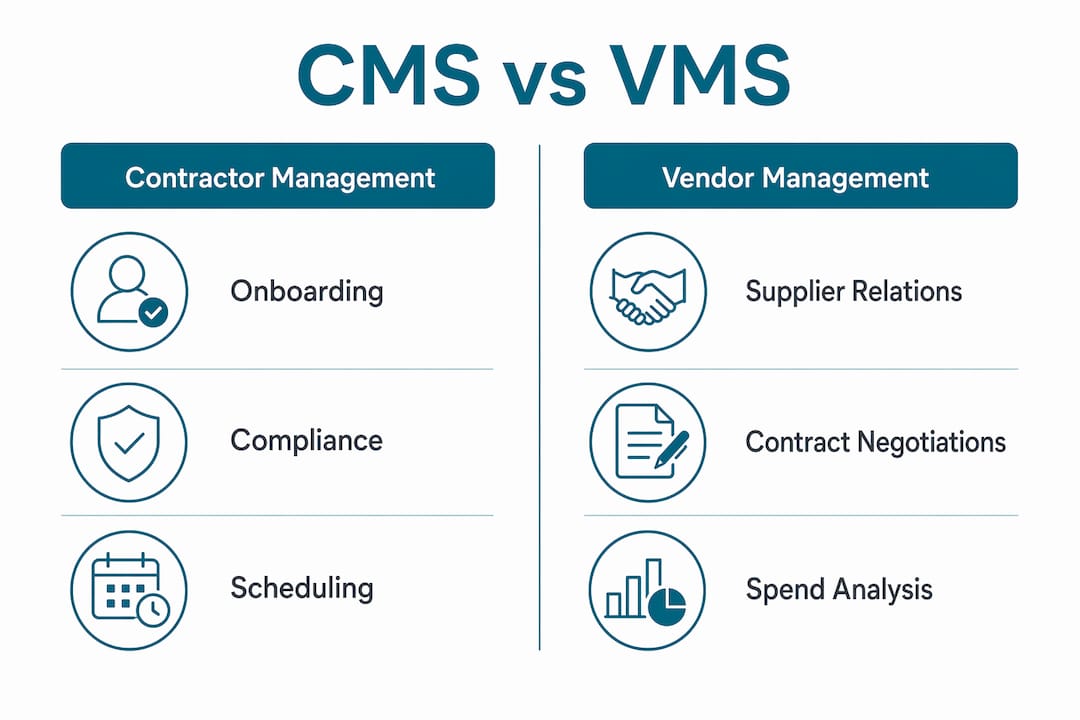
A CMS focuses on individual contractor compliance and lifecycle management. A VMS manages broader supplier relationships, contingent labor pools, and rate structures across multiple vendors. The table below shows where each system fits.
| Category | Contractor management system (CMS) | Vendor management system (VMS) |
|---|---|---|
| Primary focus | Individual contractor compliance and onboarding | Supplier relationships and contingent labor pools |
| Typical user | Field service manager, trade contractor | Procurement team, enterprise HR |
| Complexity | Moderate, designed for direct engagement | High, supports complex rate and supplier structures |
| Best fit | HVAC, plumbing, electrical, pest control crews | Large enterprises managing hundreds of vendors |
| Integration needs | Accounting, scheduling, safety tools | ERP, HR platforms, finance systems |
A small HVAC business with 10 subcontractors does not need a VMS. A CMS handles the job at a fraction of the cost and complexity. As your contractor count grows past 50 or your operations span multiple states, you may need a hybrid solution or a full VMS. The key is selecting software that matches your current scale while leaving room to grow. You can compare software side by side to identify which category fits your workforce model.
What pricing should you expect for contractor management software?
Pricing for contractor management software varies widely based on crew size, feature depth, and project volume. Small businesses typically pay $45–$49 per month for entry-level plans, while enterprise solutions can run from $5,000 to $200,000 or more annually. That range reflects real differences in capability, not just brand positioning.
The main cost drivers are:
- User count: Most platforms charge per seat. A 5-person office pays far less than a 50-person operation.
- Feature set: Compliance automation, AI-assisted dispatch, and multi-site management add cost.
- Project volume: Some platforms price by active projects or contractor records rather than users.
- Integrations: Connecting to accounting software, ERP systems, or safety platforms may require a higher tier.
Many vendors offer free trials that cover core features. Use the trial period to test the compliance alert workflow, the payment automation, and the reporting tools. Do not evaluate a platform based on the dashboard alone.
Pro Tip: Use a software cost calculator before you contact vendors. Knowing your budget ceiling and crew size in advance prevents you from being upsold into a tier you do not need.
Hidden costs are real. Watch for per-contractor fees that scale unexpectedly, charges for data exports, and support tiers that put phone access behind a premium plan. Ask vendors to provide a total cost of ownership estimate for your specific crew size and project volume before you sign anything.
Choosing a scalable solution from the start avoids costly migrations later. Many contractors underestimate growth and select software that works for 10 subcontractors but breaks down at 30. Factor in where your business will be in 24 months, not just today.
How to select and implement contractor management software effectively
Selecting the right CMS requires a structured evaluation process. The following steps reduce the risk of a bad fit and speed up deployment.
- Map your current workflow. Document how you currently onboard contractors, track compliance, assign jobs, and process payments. Identify the steps that cause the most delays or errors. These are your non-negotiable feature requirements.
- Define your must-have features. Use your workflow map to build a short list of required capabilities. Compliance automation and audit trail functionality are non-negotiable for any regulated trade. Scheduling integration and milestone-based payment are high priority for most field service operations.
- Evaluate integration compatibility. Your CMS must connect to the tools you already use. If your team runs QuickBooks for accounting and Google Calendar for scheduling, verify that the CMS integrates with both before you commit. Poor integration creates data silos that defeat the purpose of centralizing your operations. A software selection checklist helps you verify compatibility systematically.
- Test compliance automation during the trial. Create a test contractor profile with an expiring insurance certificate. Confirm that the system sends an alert, blocks dispatch, and logs the event in the audit trail. If any of those three steps require manual intervention, the automation is incomplete.
- Plan your rollout in phases. Start with onboarding and compliance tracking. Add scheduling and payment automation in the second phase. Trying to deploy every feature at once increases the chance of adoption failure.
- Train your team before go-live. A CMS only works if your office staff and field supervisors use it consistently. Schedule training sessions before launch, not after. Assign one person as the internal system owner who handles questions and monitors adoption.
- Build cross-department collaboration into the process. Successful implementation requires input from operations, finance, and compliance teams. A system configured only by the operations manager will miss the payment and audit requirements that finance and legal care about.
Treating contractor management software as merely a procurement tool misses its role in aligning contractor work with internal project milestones across departments. The best deployments connect field activity to back-office reporting in real time.
Key takeaways
Contractor management software is the most direct way to reduce compliance risk and administrative overhead across your contractor workforce.
| Point | Details |
|---|---|
| Core definition | A CMS centralizes onboarding, compliance, scheduling, and payment for independent contractors. |
| Must-have features | Prioritize automated compliance alerts, credential verification, and milestone-based payment. |
| CMS vs. VMS | Use a CMS for direct contractor engagement; move to a VMS only when managing large supplier networks. |
| Pricing range | Small teams pay $45–$49 per month; enterprise plans can exceed $200,000 annually. |
| Implementation success | Phase your rollout, test compliance automation during trials, and assign an internal system owner. |
Why I think most contractors pick software for the wrong reasons
Most contractors I talk to evaluate software based on the interface. They pick the platform that looks cleanest in the demo and skip the hard questions about compliance automation depth and integration capability. That is a mistake that shows up six months later when the system cannot connect to their accounting software or when a compliance alert fires after a contractor is already on site.
Custom spreadsheet solutions fail within 6–9 months in most cases. They lack the automation triggers and audit trails that protect you legally. I have seen HVAC operators build elaborate Google Sheets setups that worked fine at 8 subcontractors and completely collapsed at 20. The rebuild cost more in time and risk than a proper CMS would have from day one.
The other mistake is treating scalability as a future problem. Managers should prioritize scalability when selecting contractor software to handle growth, multi-site operations, and increasing subcontractor numbers. If the platform you are evaluating cannot handle 3 times your current contractor count without a tier upgrade or a migration, it is not the right platform.
All-in-one platforms work well for small teams but may require specialized integrations as operations grow. That is not a flaw. It is a design choice. Know where your business is headed and pick accordingly. The contractors who get this right treat their CMS as the operational backbone of their business, not a compliance checkbox.
— Blake
Ampleexpress matches contractors to the right software faster
Picking the right contractor management platform takes time you probably do not have. Ampleexpress evaluates over 30 field service software options and delivers a ranked shortlist matched to your crew size, trade, and operational priorities.

Whether you run an HVAC operation, a plumbing crew, or an electrical contracting business, Ampleexpress provides trade-specific software recommendations with pricing benchmarks and rollout risk ratings built in. The platform is independent, so the recommendations reflect your needs rather than vendor relationships. Share your crew size and top priorities, and Ampleexpress returns a shortlist you can act on.
FAQ
What does contractor management software do?
Contractor management software automates the full lifecycle of working with independent contractors, including onboarding, compliance tracking, job scheduling, and payment. It replaces manual document tracking with automated alerts and audit trails.
How is a CMS different from a VMS?
A CMS manages individual contractor compliance and onboarding for direct engagement. A VMS manages broader supplier networks and contingent labor pools, typically used by enterprise procurement teams.
What features should I prioritize when choosing contractor software?
Prioritize automated compliance alerts, credential verification before dispatch, milestone-based payment automation, and integration with your existing accounting tools.
How much does contractor management software cost?
Entry-level plans for small teams start around $45–$49 per month. Enterprise solutions range from $5,000 to over $200,000 annually depending on user count, features, and project volume.
Can small contractors benefit from a CMS?
Yes. A CMS reduces compliance risk and administrative time for operations of any size. Small teams benefit most from automated document tracking and dispatch controls that prevent liability exposure.