
Software Fit for Multi-Trade Contractors: 2026 Guide
Discover essential software fit for multi-trade contractors in 2026. Streamline scheduling, project management, and operations all in one platform.
June 26, 2026
Article

Software fit for multi-trade contractors is specialized technology designed to manage scheduling, project management, and procurement across HVAC, plumbing, electrical, and other trades under one connected platform. Running multiple trades from separate spreadsheets and phone calls creates scheduling conflicts, missed invoices, and slow payment cycles. Platforms like Builder Flow, Procore, and Trade-Linked address this directly by centralizing job tracking, client communication, and field dispatch. The industry term for this category is field service management software, though contractors searching for trade-specific tools will find it marketed under several names. Choosing the right system depends on your crew size, trade mix, and where your operations break down most often.
What features does software fit for multi-trade contractors need?
The most critical feature in any multi-trade platform is scheduling with build sequence logic. Trades like framing, plumbing rough-in, and electrical must follow a fixed order. Scheduling tools need buffer days built in for municipal inspection wait times, plus automatic downstream adjustments when one trade runs late. Without that logic, a delayed inspection cascades into a week of idle crews.
Centralized project management with real-time updates is the second non-negotiable. Every foreman, subcontractor, and project manager needs to see the same job status at the same time. Contractors using integrated platforms deliver projects approximately 15 days faster by centralizing communication, scheduling, and document control. That time saving translates directly to more jobs completed per year.

Document and evidence management reduces disputes and speeds payment. Unified PDF reports replace scattered texts and emails with a single branded project summary covering site photos, change orders, and sign-offs. Clients who receive clear documentation pay faster and dispute less.
Key capabilities to verify before committing to any platform:
- Multi-trade scheduling with dependency logic and inspection buffer days
- Mobile field access for real-time job updates, not just office-based planning
- Procurement and supply chain integration to track material orders across trades
- Accounting and invoicing connections to QuickBooks, Xero, or similar tools
- CRM and lead management to track quotes and follow-ups in one place
- Document storage for photos, contracts, and compliance records
Pro Tip: Verify that the mobile app works offline. Field crews in basements or rural sites lose connectivity regularly, and a platform that requires a signal to log work creates data gaps.
Most project management tools are built for office-based planning, but multi-trade contractors need field-centric features for real-time workforce and asset tracking. A platform that looks great on a desktop but frustrates field crews will not get used consistently.
How do you choose the best software for multi-trade contractors?
The right platform depends on which part of your operation breaks down first. The ideal software depends on which project phase poses the biggest operational challenge. If estimating takes too long, prioritize quoting and takeoff tools. If jobs run over budget, focus on project cost tracking. If invoices sit unpaid, target platforms with integrated billing and client portals.
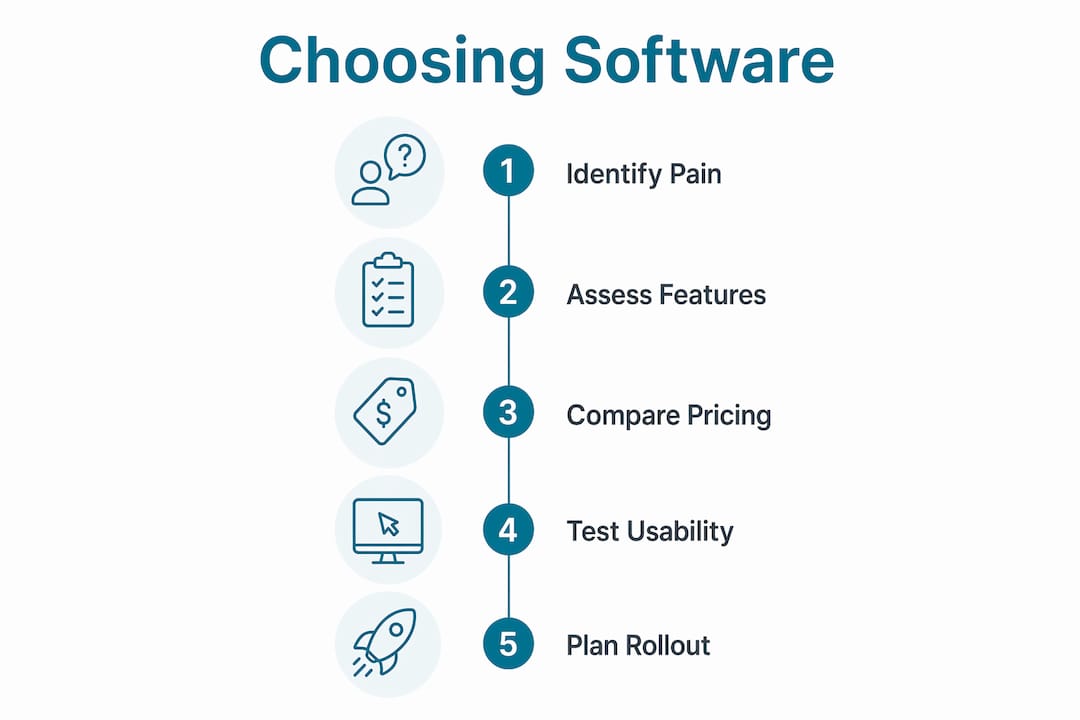
Software for contractors falls into two broad tiers. Best-of-breed tools solve one problem exceptionally well, such as Bella FSM for scheduling or Builder Flow for lead management. All-in-one enterprise platforms like Procore cover the full project lifecycle but carry higher costs and longer rollout timelines.
Pricing ranges widely. Small-business tools price from $49 to $332 per month, while large enterprise solutions can cost $10,000 to over $200,000 annually depending on project volume and revenue. That gap matters. A 5-person HVAC and plumbing crew does not need a $100,000-per-year platform built for a 200-person general contractor.
Pro Tip: Use the software cost calculator from Ampleexpress to estimate your realistic investment before contacting vendors. It prevents sticker shock and sharpens your negotiating position.
| Platform tier | Best for | Approximate cost | Key strength |
|---|---|---|---|
| Entry-level tools (e.g., Builder Flow) | 1–15 staff, single or dual trade | $49–$150/month | Lead management, mobile dispatch |
| Mid-market platforms (e.g., Bella FSM) | 10–50 staff, multi-trade scheduling | $150–$500/month | Trade sequencing, inspection tracking |
| Enterprise platforms (e.g., Procore) | 50+ staff, large project volume | $10,000+/year | End-to-end project lifecycle management |
| Specialized tools (e.g., Trade-Linked) | General builders, margin-focused | Varies | Unified client reporting, margin control |
Contractors benefit most from platforms that reduce administrative complexity across quoting, scheduling, and invoicing rather than piling on features. A tool with 50 features you never use creates more friction than one with 10 that fit your workflow exactly.
How to implement multi-trade contractor software successfully
A failed rollout wastes money and frustrates crews. The steps below prevent the most common failure points.
- Map your current workflows before selecting software. Document how jobs move from quote to completion today. Identify where delays, errors, or double-entry occur. Software cannot fix a process you have not defined.
- Standardize job types and trade sequences first. Decide on your standard build order for a typical project before configuring the scheduling module. Bella FSM, for example, requires you to define trade dependencies upfront so its build sequence logic can auto-adjust when delays hit.
- Train field crews on mobile features before office staff on reporting. Field adoption drives data quality. If technicians do not log work correctly on-site, every report and invoice downstream is inaccurate.
- Automate follow-ups from day one. Platforms with automated communication features help contractors convert 60–80% more leads compared to manual follow-up processes. Set up automated quote reminders and job confirmation messages during the first week of rollout.
- Centralize all client and subcontractor documents in one location. Use the platform's document storage from the first job. Scattered files in email threads and shared drives undermine the entire system.
- Review schedule performance weekly for the first 90 days. Check whether buffer days are sufficient for your local inspection wait times. Adjust trade sequences based on real job data, not assumptions.
Pro Tip: Assign one internal champion per trade during rollout. That person becomes the go-to resource for their crew and catches adoption problems before they spread.
Trying to solve all software needs simultaneously with a large enterprise tool before your team is ready often causes implementation failure. Start with the module that addresses your biggest pain point, then expand.
Comparing top software solutions for multi-trade contractors in 2026
Four platforms consistently appear in contractor evaluations for multi-trade operations. Each serves a different company profile.
Builder Flow targets all construction trades with a mobile-first design and strong lead management. Its pipeline view tracks every quote and follow-up in one place, which benefits contractors who lose jobs to slow response times. Builder Flow suits crews of 1–20 staff running residential or light commercial work.
Procore covers the full construction project lifecycle from bidding through closeout. It connects general contractors with subcontractors, owners, and inspectors on a single platform. Procore's strength is large project coordination, making it the right choice for contractors managing multiple simultaneous projects above $1 million in value.
Trade-Linked focuses on general builders who need unified client reporting and margin control. Its branded PDF reports replace fragmented communication and reduce disputes over change orders. Trade-Linked suits contractors who lose time chasing payment or managing client expectations across long projects.
Bella FSM specializes in contractor scheduling with trade sequencing and inspection management. Its scheduling engine understands build dependencies and adjusts automatically when a trade runs late or an inspection is delayed. Bella FSM is the strongest choice for contractors whose primary pain point is scheduling conflicts between trades.
| Platform | Primary strength | Ideal company size | Scheduling logic | Mobile field app |
|---|---|---|---|---|
| Builder Flow | Lead management | 1–20 staff | Basic | Yes |
| Procore | End-to-end project management | 50+ staff | Advanced | Yes |
| Trade-Linked | Client reporting, margin control | 5–30 staff | Moderate | Yes |
| Bella FSM | Trade sequencing, inspection tracking | 10–50 staff | Advanced | Yes |
Key considerations when comparing platforms:
- Integration depth: Does it connect to your accounting tool without a manual export?
- Pricing transparency: Are per-user fees clearly listed, or do they require a sales call?
- Rollout support: Does the vendor provide onboarding for field crews, not just admins?
- Regional fit: Does the platform account for local inspection timelines and permit workflows?
Ampleexpress evaluates over 30 field service software options and ranks them by crew size, trade mix, and rollout risk. That independent view helps contractors avoid platforms that look strong in demos but underperform in the field. You can review contractor software selection criteria to build your own evaluation framework before talking to vendors.
Key takeaways
The most effective software fit for multi-trade contractors connects scheduling, project management, and invoicing in one platform, matched to your crew size and primary operational pain point.
| Point | Details |
|---|---|
| Match software to your pain point | Identify whether estimating, scheduling, or invoicing causes the most delays before selecting a platform. |
| Pricing scales with company size | Tools range from $49/month for small crews to over $200,000/year for enterprise operations. |
| Field adoption drives data quality | Train field crews on mobile features first so job data is accurate from day one. |
| Scheduling logic prevents cascading delays | Choose platforms with build sequence logic and automatic adjustments for inspection wait times. |
| Avoid premature enterprise tools | Starting with a focused best-of-breed tool improves adoption and ROI for smaller operations. |
What I have learned from watching contractors choose the wrong platform
The most common mistake I see is contractors buying the most feature-rich platform they can afford, then using 15% of it. A 12-person HVAC and plumbing operation does not need the same tool as a 200-person general contractor. The complexity of an enterprise platform does not add value. It adds friction, and friction kills adoption.
The contractors who get the best results start narrow. They pick one platform that solves their single biggest problem, get their crews using it consistently, and then expand. A company that cannot get field techs to log job notes in a simple app will not succeed with a platform that requires 14 steps to close a work order.
Scheduling flexibility is the feature most contractors underestimate until they need it. When a municipal inspection gets delayed by four days, a rigid scheduling tool forces you to manually reschedule every downstream trade. A platform with real sequence logic handles that automatically. That difference alone can save hours of admin time per project.
My practical advice: before you demo any platform, write down the three workflows that cost you the most time or money each month. Test every vendor against those three scenarios specifically. Ignore everything else in the demo. The vendor will show you the impressive features. You need to see whether the tool handles your actual problems.
— Blake
How Ampleexpress helps multi-trade contractors find the right fit
Multi-trade contractors running HVAC, plumbing, and electrical operations need software that matches their specific crew size and trade mix, not a generic recommendation from a vendor with one product to sell.

Ampleexpress provides an independent ranked shortlist of field service software by trade, covering over 30 platforms with pricing paths, rollout risk ratings, and fit recommendations for each crew size. The platform also includes regional pricing benchmarks so you know whether a vendor's quote is competitive in your market. If you want to see which platforms fit your operation before committing to a demo, Ampleexpress gives you that clarity without a sales pitch attached.
FAQ
What is software fit for multi-trade contractors?
Software fit for multi-trade contractors is field service management technology that connects scheduling, dispatch, project tracking, and invoicing across multiple trades like HVAC, plumbing, and electrical in one platform.
How much does multi-trade contractor software cost?
Pricing ranges from $49 per month for small-business tools to over $200,000 per year for enterprise platforms, depending on crew size and project volume.
Which platform is best for scheduling across multiple trades?
Bella FSM is built specifically for multi-trade scheduling with build sequence logic and automatic adjustments for inspection delays, making it the strongest choice for scheduling-focused operations.
Should small contractors use an all-in-one platform?
Small contractors with fewer than 20 staff benefit more from a focused best-of-breed tool than an all-in-one enterprise platform. Premature investment in complex systems often leads to low adoption and wasted spend.
How does integrated software reduce payment delays?
Platforms like Trade-Linked centralize site photos, change orders, and client sign-offs into unified branded reports, which replace fragmented email chains and reduce disputes that slow invoice approval.