
How to Switch Field Service Software Providers
Learn how to switch field service software providers effectively to boost productivity, reduce costs, and improve operations for your team.
June 15, 2026
Article

Switching field service software providers is the process of replacing your current field service management (FSM) platform with a new solution that better fits your crew size, trade, and operational goals. Done right, the move delivers measurable results: 40% less administrative time, doubled technician productivity, and 10–20% lower service costs. Most teams see ROI within 6–12 months by automating scheduling, dispatching, and work order management. Platforms like ServiceTitan, Microsoft Dynamics 365, and Salesforce Field Service are common destinations, but the right choice depends on your specific trade and team size, not brand recognition alone.
What criteria matter when you switch field service software providers?
Choosing the right FSM software depends on your industry, current revenue, and operational bottlenecks, not software ratings or brand prestige. A five-technician plumbing crew and a 50-technician HVAC company have completely different dispatch, invoicing, and scheduling demands. Start your evaluation by mapping your actual workflow gaps before looking at any vendor demo.
Match features to your trade and team size
Purpose-built FSM software outperforms generic ERP modules by optimizing real-time dispatch, on-site mobile data capture, and work order management for field trades. Industry-specific solutions for HVAC, plumbing, electrical, and pest control boost user adoption significantly compared to general business software. If your technicians spend more time navigating menus than capturing job data, the software is not built for your trade.

The table below shows how pricing tiers align with typical team sizes and feature sets:
| Tier | Monthly Cost Per User | Best For | Key Features |
|---|---|---|---|
| Basic | $0–$50 | 1–5 technicians | Scheduling, invoicing, mobile access |
| Mid-Range | $50–$150 | 6–25 technicians | GPS tracking, CRM integration, reporting |
| Enterprise | $200–$500+ | 25+ technicians | AI scheduling, IoT, ERP/CRM connectors |
FSM software costs vary sharply by tier, and pricing jumps of 10x or more when scaling your team are a real risk. Review the 2026 pricing benchmarks for service businesses before committing to any contract.
Evaluate integration and mobile capabilities
Your new platform must connect cleanly with your existing ERP, CRM, and accounting systems. Neglecting two-way syncing creates data silos requiring manual reconciliation, which wipes out the efficiency gains you switched for. Prioritize platforms with prebuilt connectors for tools like QuickBooks, Salesforce, or SAP, and verify that mobile apps work offline for technicians in low-signal areas.
Key capabilities to verify before signing:
- Real-time dispatch and scheduling with drag-and-drop or AI-assisted assignment
- Offline mobile access so technicians can capture job data without a signal
- Two-way ERP and CRM sync to prevent back-office data conflicts
- GPS tracking and route optimization to reduce drive time between jobs
- Configurable work order templates matched to your specific trade
Understanding why software needs differ by trade is the fastest way to narrow your shortlist from 30 options to 3.
How to prepare before switching FSM software
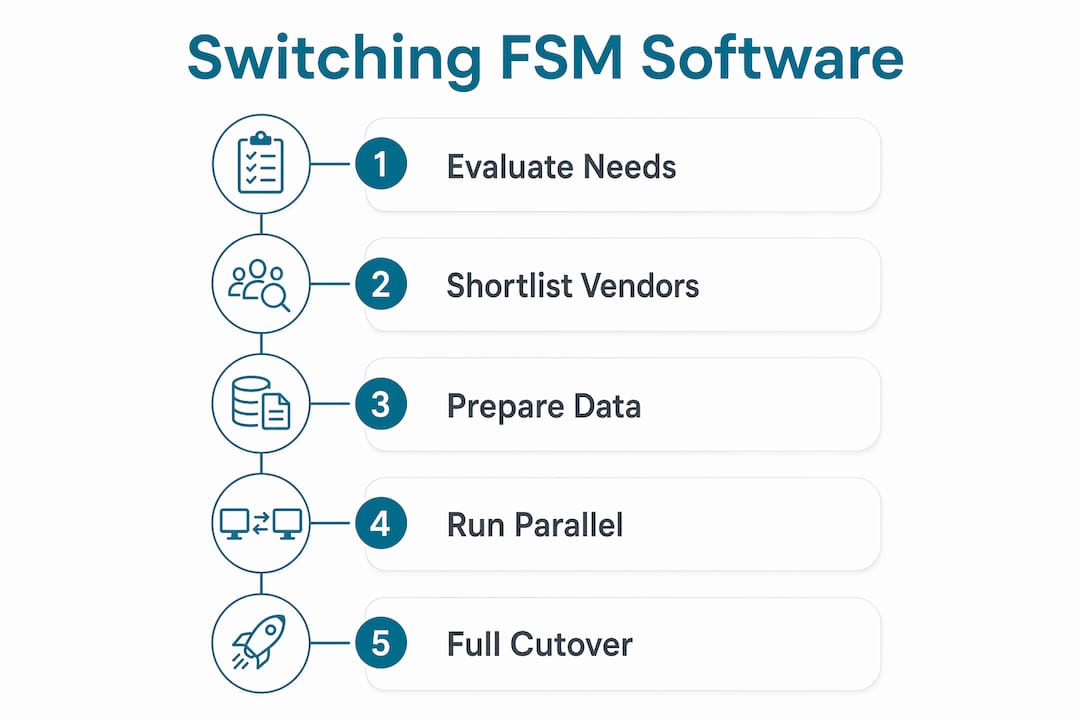
Preparation is where most transitions succeed or fail. A rushed cutover without a clear data map and training plan creates technician confusion, lost job history, and billing errors that take weeks to untangle.
Follow these steps before you touch a single migration setting:
- Audit your current workflows. Document every process your team uses today: how jobs are created, dispatched, completed, and invoiced. Identify which steps are manual and which are automated.
- Map your data. List every data type you need to migrate: customer records, job history, equipment assets, invoices, and technician schedules. Confirm the new platform can import each one.
- Set measurable goals. Define success metrics before you start. First-time fix rate and technician utilization are the metrics that drive real FSM value, not just ease-of-use scores from a demo.
- Assess legacy system dependencies. Identify every system your current FSM touches: accounting software, parts ordering, customer portals. Plan how each connection will be rebuilt in the new platform.
- Plan your integration strategy. Enterprise-level FSM integrations via APIs can be deployed within weeks using prebuilt connectors, without replacing entire back-office systems. Review the role of APIs in FSM software to understand your middleware options.
- Build a training and change management plan. Assign a rollout lead, schedule hands-on training sessions, and identify which technicians will serve as early adopters and internal champions.
Pro Tip: Run a parallel operation for at least two weeks before full cutover. Keep your old system active while your pilot team uses the new one. This catches data gaps and workflow mismatches before they affect your entire crew.
How do you execute the software switch without disrupting operations?
Execution is a phased process, not a single event. A full cutover on day one is the fastest path to technician frustration and missed jobs. Structure your rollout in four stages:
- Data migration and validation. Export all records from your current system. Import them into the new platform in a test environment. Verify that customer records, job history, and pricing match exactly before going live.
- Pilot team deployment. Select 3–5 technicians and one dispatcher to run the new system for two to four weeks. Collect daily feedback on workflow gaps, mobile app issues, and dispatch accuracy.
- Full team rollout. After the pilot confirms stability, roll out to the full crew in a single week. Avoid a slow, department-by-department approach that creates two parallel systems running indefinitely.
- KPI monitoring post-launch. Track first-time fix rate, average job completion time, and technician utilization weekly for the first 90 days. These numbers tell you whether the switch is delivering its promised gains.
| Rollout Phase | Duration | Key Action | Success Indicator |
|---|---|---|---|
| Data Migration | 1–2 weeks | Export, import, validate all records | Zero data discrepancies in test environment |
| Pilot Deployment | 2–4 weeks | Run new system with small team | Positive technician feedback, no missed jobs |
| Full Rollout | 1 week | Deploy to all technicians and dispatchers | All jobs dispatched through new platform |
| KPI Monitoring | 90 days | Track fix rate, utilization, job time | Measurable improvement vs. pre-switch baseline |
Pro Tip: Assign a dedicated rollout lead who is not the business owner. This person owns daily check-ins with technicians, escalates issues to the vendor, and keeps the timeline on track. Without a single point of accountability, migrations drift.
What are the most common problems after switching FSM software?
Even well-planned migrations hit friction. Knowing the most common failure points lets you address them before they stall your ROI.
- Technician resistance. Technician adoption is the biggest failure point during FSM migration. Technicians who find the new app harder than their old process will create workarounds, like texting job updates instead of logging them, that neutralize every efficiency gain. Counter this with hands-on training, not video tutorials, and tie app usage to performance incentives.
- Integration friction. Ignoring two-way syncing between your FSM and back-office systems causes data silos. Your dispatcher sees one job status while your accounting team sees another. Map every data flow before go-live and test each sync point in your pilot phase.
- Overbuying complexity. Purchasing enterprise FSM with AI and IoT features that exceed your current capabilities causes implementation bloat and extended timelines. Match software complexity to your current bottlenecks, not a growth plan that is three years away.
- Pricing surprises. Add-on fees for mobile access, GPS tracking, or additional users can push your monthly cost well above the base price you negotiated. Read every line of the contract and ask vendors to itemize all fees for your projected team size in 12 months.
"The software is only as good as the team using it. If your technicians don't trust the new system, your dispatch accuracy and first-time fix rate will drop regardless of how advanced the platform is."
Renewing adoption after a stalled rollout requires direct intervention. Hold a team meeting, acknowledge the friction points, and make visible improvements based on technician feedback within the first 30 days.
Key takeaways
Switching FSM providers delivers the strongest ROI when you match software complexity to your current operational needs, execute a phased rollout, and prioritize technician adoption from day one.
| Point | Details |
|---|---|
| Match software to your trade | Purpose-built FSM tools outperform generic ERP modules for field trades like HVAC, plumbing, and electrical. |
| Set metrics before you migrate | Define first-time fix rate and technician utilization targets before selecting any platform. |
| Use a phased rollout | Pilot with a small team first to catch data gaps and workflow issues before full deployment. |
| Plan integrations early | Map every ERP, CRM, and accounting connection before go-live to prevent data silos. |
| Address technician resistance directly | Hands-on training and usage incentives are the most effective tools for driving adoption. |
What i've learned from watching FSM migrations go wrong
Most FSM migrations that fail do not fail because of the software. They fail because the business owner chose a platform based on a polished demo rather than a hard look at their actual workflow bottlenecks.
The pattern repeats itself: a contractor sees ServiceTitan or Microsoft Dynamics 365 at a trade show, signs a contract, and then discovers the platform was built for a company three times their size. The implementation drags on for months, technicians resist the new app, and the business ends up paying for features it will never use.
The fix is not complicated, but it requires discipline. Before you evaluate a single vendor, write down the three operational problems costing you the most money right now. Is it missed appointments? Slow invoicing? Technicians driving to the wrong job? Your software choice should solve those three problems first. Everything else is secondary.
Human factors matter as much as technology in any migration. A technician who has used the same dispatch app for four years will not switch willingly without a clear reason. Show your crew exactly how the new system makes their day easier: fewer phone calls from dispatch, faster job completion on mobile, less paperwork at the end of a shift. When technicians see a direct personal benefit, adoption follows.
My strongest recommendation: do not skip the pilot phase. Two weeks with a small team will surface every integration gap, mobile app issue, and workflow mismatch before they affect your entire operation. The contractors who rush to a full cutover are the ones calling their vendor for emergency support on a Monday morning.
— Blake
Find the right FSM software for your trade with Ampleexpress
Ampleexpress evaluates over 30 field service management tools and ranks them by trade, crew size, and rollout risk so you do not have to spend weeks comparing vendor websites.

Whether you run an HVAC crew of 5 or a plumbing operation with 30 technicians, Ampleexpress provides a ranked shortlist with clear pricing paths, integration fit scores, and regional benchmarks. The platform flags which tools carry high rollout risk for your crew size and which offer the fastest path to ROI. Explore FSM software options by trade to see ranked recommendations for HVAC, plumbing, electrical, and pest control teams, complete with pricing tiers and integration support details.
FAQ
What is field service management software?
Field service management (FSM) software is a platform that automates scheduling, dispatch, work orders, and invoicing for teams that work at customer locations. It replaces manual processes with digital workflows that connect office staff and field technicians in real time.
How long does it take to switch FSM software?
Most FSM migrations take 4–12 weeks from data export to full deployment. Enterprise-level integrations via APIs can be deployed within weeks using prebuilt connectors, while full system replacements with complex data migrations take longer.
What is the biggest risk when switching FSM providers?
Technician resistance is the leading cause of failed FSM migrations. Without hands-on training and clear incentives for app adoption, technicians create workarounds that eliminate the productivity gains the new software was meant to deliver.
How do i avoid paying too much for FSM software?
Review all add-on fees for mobile access, GPS, and additional users before signing. FSM pricing ranges from $0–$50 per user per month at the basic tier to $200–$500+ at the enterprise level, and costs can scale sharply as your team grows.
Should i choose a trade-specific or general FSM platform?
Choose a trade-specific platform whenever possible. Purpose-built FSM software for trades like HVAC, plumbing, and electrical delivers higher adoption rates and better operational results than general ERP modules that were not designed for field dispatch workflows.