
Tax Compliance in Plumbing Software: 2026 Guide
Discover the vital role of tax compliance in plumbing software. Ensure your business stays audit-ready, avoids penalties, and reports accurately.
July 1, 2026
Article

Tax compliance in plumbing software refers to the automation and management of tax duties, including sales tax, payroll taxes, and digital reporting requirements, embedded directly within field service management tools. The role of tax compliance in plumbing software goes beyond simple invoice math. It determines whether your business stays audit-ready, avoids penalties, and reports income accurately across every job. Plumbing businesses face a specific challenge: 23 states exempt repair labor from sales tax, while others tax both parts and labor. Without software that handles these distinctions automatically, you are one misclassified line item away from a costly filing error.
What is the role of tax compliance in plumbing software?
Tax compliance in plumbing software is the built-in ability to calculate, track, and report taxes correctly across every invoice, payroll cycle, and jurisdiction your business operates in. This is not a bonus feature. It is a core operational requirement for any plumbing business running more than a handful of jobs per week.
The most critical function is automated sales tax calculation by location and line item. When a technician completes a water heater replacement in one county and a pipe repair in another, the tax treatment for parts versus labor can differ entirely. Software that applies jurisdictional rules at the line item level removes the guesswork from every invoice.
Tax compliance also covers payroll tax tracking, exemption certificate management, and digital reporting mandates. In the UK, HMRC's Making Tax Digital program requires plumbers earning over £50,000 to submit quarterly digital tax updates starting april 2026. That kind of regulatory shift demands software that is built for compliance, not retrofitted for it.
The importance of tax compliance in this context is financial clarity. When your software handles tax correctly from the first invoice, your books reflect reality. When it does not, you spend tax season correcting errors instead of running your business.

How plumbing software automates and manages tax compliance
Good plumbing software handles tax compliance through several interconnected features. Each one addresses a specific failure point that manual processes cannot reliably cover.
- Line-item tax classification: Software must distinguish between taxable parts and exempt labor on every invoice. Line-item exemption capability is the single most important tax feature in any field service app, especially for businesses operating across multiple states.
- Jurisdiction-based rate application: Tax rates change by city, county, and state. Software that pulls current rates by job location applies the correct percentage without manual lookup.
- Exemption certificate storage: Some customers, such as property managers or government entities, qualify for tax exemptions. Software should store these certificates digitally and apply them automatically when invoicing those accounts.
- Sync with accounting platforms: Your field service management tool feeds data into accounting software like QuickBooks Online. When that sync is clean and real-time, your tax records stay accurate. When it breaks, your books do not match your bank.
- Payroll tax tracking: Software that tracks fully burdened labor rates, including payroll taxes and overhead, gives you an accurate picture of job profitability before you price the next bid.
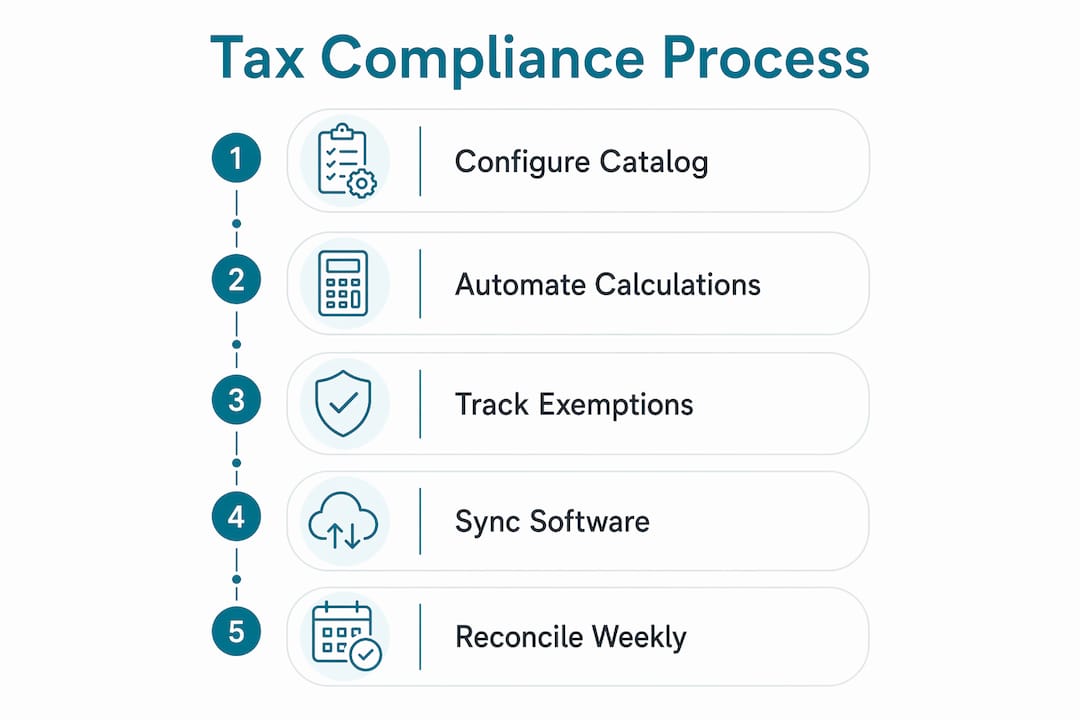
Pro Tip: Configure every service and product in your software catalog with the correct tax classification before you go live. Fixing misclassified line items after hundreds of invoices have been generated creates a reconciliation problem that takes far longer to resolve than the initial setup.
Syncing issues between field service management and accounting software are the most common source of tax errors in plumbing businesses. A job closed in the field app must transfer correctly to your accounting platform with the right tax codes attached. Any gap in that transfer creates a discrepancy that compounds over time.
How does tax compliance affect bookkeeping and financial accuracy?
Tax compliance directly determines the quality of your bookkeeping. QuickBooks Online acts as the permanent financial record for most plumbing businesses, while your field service management tool supplies the high-velocity operational data. When those two systems stay in sync, your financial reports reflect actual performance. When they drift, your tax filings reflect a business that does not exist.
The most damaging sync error involves clearing accounts. When your field service app records a payment but the accounting software logs it differently, you can end up with phantom income on your books. A real-world example: if your software reports $50,000 in collected payments but only $48,000 hits your bank account, that $2,000 discrepancy creates a tax overpayment risk unless you catch and reconcile it.
Here is a numbered process for maintaining bookkeeping accuracy through tax compliance features:
- Reconcile clearing accounts weekly. Do not wait until month-end. Small discrepancies are easier to trace when the job is still fresh.
- Match bank deposits to software-reported collections. Every deposit should tie directly to invoices closed in your field service app.
- Verify payroll tax entries each pay period. Fully burdened labor rates include payroll taxes and overhead. Tracking these accurately prevents you from underpricing jobs.
- Run a tax liability report before each filing period. Compare it against your accounting platform's records to catch any mismatch before it becomes a filing error.
- Archive exemption certificates with the corresponding invoices. Auditors request these documents by job, not by customer name.
Pro Tip: Set up a recurring calendar reminder to reconcile your clearing account and bank deposits every Friday. Fifteen minutes of weekly reconciliation prevents hours of forensic bookkeeping at quarter-end.
Payroll tax accuracy is equally critical. Automated processing supports up to 5,000 1099 and W-2 forms for small and mid-sized businesses, which means the infrastructure exists to handle your crew size. The question is whether your software is configured to use it correctly.
What jurisdictional tax rules do plumbing businesses need to know?
Tax rules for plumbing services vary significantly by state and country. The variation is not minor. It determines whether a $5,000 job carries $400 in sales tax or zero.
The core distinction is labor versus materials. 23 US states do not tax plumbing repair labor. That means in those states, your technician's time on a service call is not a taxable line item, but the parts installed are. Other states tax both. A few tax neither for certain repair categories. Your software must reflect these rules accurately for every job location.
Here is a summary of the key jurisdictional rules to watch:
- Labor-exempt states: Repair labor is not taxable. Parts and materials are taxable. Software must split invoices by line item type.
- Labor-taxable states: Both labor and materials are taxable on installation and repair jobs. Flat-rate invoices need to carry the full tax amount.
- New construction rules: Many states treat new construction differently from repair work. Installation labor on new builds is often taxable even in labor-exempt states.
- UK VAT and CIS: UK plumbers must track VAT and Construction Industry Scheme deductions. Software without native CIS support leads to reporting inaccuracies and HMRC penalties.
- Making Tax Digital (MTD): HMRC mandates quarterly digital reporting for UK plumbers over the £50,000 threshold. This requires software that can generate compliant digital records, not just spreadsheets.
| Jurisdiction | Labor taxable | Materials taxable | Special rules |
|---|---|---|---|
| 23 US states (repair) | No | Yes | Line-item split required |
| Remaining US states | Yes | Yes | Full invoice taxable |
| New construction (most states) | Yes | Yes | Separate from repair rules |
| United Kingdom | VAT applies | VAT applies | CIS deductions required |
Software compatibility with multiple jurisdictions is not optional if you operate across state lines or serve commercial clients with locations in different states. Verify that your platform updates tax rates automatically and allows you to set job-level tax rules by address.
Best practices for using tax compliance features in plumbing software
Choosing software with tax compliance features is step one. Configuring and maintaining those features correctly is where most plumbing businesses fall short.
- Integrate with QuickBooks Online or a comparable accounting platform. Your field service app should push clean, coded data to your accounting software without manual re-entry. Manual re-entry introduces errors every time.
- Require real-time data entry from the field. Technicians should close jobs, attach photos, and confirm parts used before leaving the job site. Delayed entry creates gaps that corrupt your tax records.
- Update tax rate settings at least quarterly. Rates change. A county rate that was accurate in january may be wrong by april. Most platforms allow automatic rate updates. Turn that feature on.
- Maintain a complete audit trail. Every invoice, payment, exemption certificate, and tax adjustment should be logged with a timestamp and user ID. Audit trails are your first line of defense in a tax examination.
- Train your office staff on tax exemption workflows. A certificate stored in a filing cabinet does not help when your software applies tax to an exempt customer. Staff need to know how to enter, verify, and apply exemptions in the system.
Pro Tip: Treat tax compliance as a continuous business function, not a year-end task. Schedule a monthly 30-minute review of your tax settings, exemption certificates, and sync status. Catching a configuration error in month two costs far less than correcting 11 months of bad data.
Tax compliance software should provide a unified view of your tax data that mirrors what tax authorities see. When your software shows the same picture as the government's analysis, you can defend your tax position before an audit ever starts. That is the standard worth holding your software to.
Key Takeaways
Tax compliance in plumbing software is a built-in operational function that protects your business from penalties, audit risk, and financial reporting errors across every jurisdiction you serve.
| Point | Details |
|---|---|
| Line-item classification matters | Software must split labor and parts tax treatment, especially in the 23 states that exempt repair labor. |
| Sync errors create phantom income | A $2,000 discrepancy between reported collections and bank deposits triggers tax overpayment risk. |
| Quarterly reconciliation is non-negotiable | Weekly clearing account checks prevent compounding errors that take months to unwind. |
| Jurisdictional rules vary widely | US state rules, UK VAT, and CIS deductions each require software configured for that specific market. |
| Compliance is continuous | Monthly reviews of tax settings, exemption certificates, and sync status keep your books audit-ready year-round. |
Why I think most plumbing businesses are one sync error away from a tax problem
Most plumbing business owners I talk to treat tax compliance as an accounting department issue. They buy field service software for dispatch and scheduling, then assume the tax piece takes care of itself. It does not.
The shift to quarterly digital reporting in the UK and the increasing automation of audit detection in the US means tax authorities are catching discrepancies faster than ever. A sync error that would have gone unnoticed in an annual review now gets flagged in a quarterly data match.
The plumbing labor tax exemption rules are particularly dangerous territory. Tax compliance software that gives you a real-time view of your tax position is the only reliable defense. Waiting for your accountant to find the problem at year-end is too late.
My honest recommendation: when you evaluate plumbing software, put tax configuration on the same level as scheduling and invoicing. Ask the vendor to show you exactly how labor and parts are classified on a multi-state invoice. Ask how exemption certificates are stored and applied. Ask what happens when the sync between your field app and QuickBooks fails. The answers will tell you more about the software's real-world value than any feature checklist.
— Blake
Ampleexpress helps you find plumbing software built for tax compliance
Choosing the right plumbing software for tax management is not about picking the most popular platform. It is about finding the one that fits your crew size, your operating states, and your accounting setup.

Ampleexpress evaluates over 30 field service software options and ranks them by tax compliance capability, integration quality, and fit for your specific operation. The platform highlights which tools handle line-item tax classification, which integrate cleanly with QuickBooks Online, and which carry hidden configuration costs that show up after you sign. Share your crew size and the states you operate in, and Ampleexpress delivers a shortlist built around your actual compliance needs, not a generic top-ten list.
FAQ
What does tax compliance mean in plumbing software?
Tax compliance in plumbing software means the platform automatically calculates, applies, and tracks sales tax, payroll tax, and exemptions on every invoice and payroll cycle. It removes manual tax decisions from your technicians and office staff.
Which states do not tax plumbing repair labor?
23 US states exempt plumbing repair labor from sales tax. In those states, only parts and materials are taxable, which means your software must classify every line item correctly to avoid over-collecting or under-reporting tax.
What is Making Tax Digital and does it affect US plumbers?
Making Tax Digital is an HMRC mandate requiring UK plumbers earning over £50,000 to submit quarterly digital tax records starting april 2026. It does not apply to US-based plumbers, but it signals a global trend toward more frequent, automated tax reporting.
What causes phantom income in plumbing bookkeeping?
Phantom income occurs when your field service app reports more collected revenue than your bank actually received. A clearing account discrepancy of even a few thousand dollars creates a tax overpayment risk unless you reconcile it before filing.
How often should plumbing businesses update their tax settings in software?
Update tax rate settings at least quarterly. Rates change at the county and city level throughout the year, and most plumbing software platforms support automatic rate updates that remove the need for manual checks.