
Software Cost per Job: A 2026 Guide for Contractors
Learn what software cost per job is and how this crucial metric can help contractors price jobs accurately and protect profit margins.
July 12, 2026
Article

Software cost per job is defined as the total of direct materials, direct labor, and applied overhead divided by the number of jobs completed. This industry metric, also called job costing, gives field service managers a clear, auditable number for every dispatch. Without it, you are pricing on instinct rather than data, and instinct does not protect your margins. The core job costing formula is straightforward: (Direct materials + Direct labor + Applied overhead) ÷ Number of jobs. Ampleexpress works with HVAC, plumbing, electrical, and pest control contractors who use this number daily to set prices that actually hold up.
What is software cost per job, and why does it matter?
Software cost per job is the per-unit cost figure that tells you exactly what it costs your business to complete one job. Field service managers use it to verify that every quote covers real expenses, not just the obvious ones. The number matters because underpricing is one of the fastest ways to erode cash flow in a contracting business.
Job costing software automates this calculation by tracking real-time revenue and expenses for each project as work progresses. That means you can see a 52% margin on a $3,200 job while the technician is still on site. That visibility lets you make immediate decisions, not post-job corrections.
Manual estimation cannot match that speed or accuracy. When you rely on spreadsheets or memory, you miss costs that accumulate quietly: a second trip to the supply house, an extra hour of labor, or a software subscription that nobody allocated. Job costing software captures all of it automatically, so your cost analysis for software and labor reflects reality.
Pro Tip: Set your job costing software to flag any job where actual costs exceed the estimate by more than 10%. That threshold catches scope creep before it becomes a loss.
How does job costing software automate cost tracking?
Job costing software assigns every expense to a specific job the moment it is recorded. Labor hours logged in the field, parts scanned at the truck, and overhead rates applied by the system all flow into a single cost sheet per job. The result is a live picture of profitability for every active project.
Cost sheets are the core output. They accumulate direct materials, labor, and overhead for each job and update in real time. A plumbing crew finishing a water heater replacement can see the exact margin before they pack up the van.

The contrast with manual methods is significant. A field manager estimating costs by memory might forget to include payroll taxes, vehicle fuel, or the monthly dispatch software subscription. Job costing software applies a predetermined overhead rate automatically, so those costs appear on every job without anyone having to remember them.
Key automation features to look for in field service software:
- Real-time labor tracking: Technicians clock in and out per job, and the system converts hours to dollars instantly.
- Materials capture: Parts are logged at point of use, not estimated after the fact.
- Overhead allocation: The system applies a rate per labor hour or per job, distributing indirect costs consistently.
- Margin alerts: Automated flags notify managers when a job's cost exceeds the quoted amount.
- Job history: Every completed job builds a cost database you can use to sharpen future estimates.
This level of detail is what separates contractors with healthy cash flow from those who finish a busy month and wonder where the money went.
What costs are included in software cost per job?
The basic formula covers three categories: direct materials, direct labor, and applied overhead. Each one requires a clear definition to avoid undercounting.
- Direct materials. These are the physical items consumed on a specific job. For an HVAC contractor, that means refrigerant, filters, capacitors, and copper fittings. For an electrician, it means wire, breakers, conduit, and connectors. Every item that leaves the truck for a specific job is a direct material cost.
- Direct labor. This is the total cost of the technician's time on that job, not just the hourly wage. Direct labor includes payroll taxes, workers' compensation insurance, and any benefits tied to that employee. A technician earning $28 per hour may cost the business $38 per hour once all employment costs are added. Ignoring the difference is a common and expensive mistake.
- Manufacturing overhead. This category covers all indirect costs that support operations but cannot be tied to a single job. Examples include:
- Office rent and utilities
- Vehicle depreciation and insurance
- Administrative staff time
- Software subscriptions (dispatch, scheduling, invoicing tools)
- Shop supplies and small tools
- Predetermined overhead rate. Overhead is allocated using a rate calculated before the period begins. A common method divides total expected overhead by total expected labor hours. If your shop expects $120,000 in overhead and 4,000 labor hours, the rate is $30 per labor hour. Every job gets charged $30 for each hour a technician works on it.
- Software subscriptions as overhead. Field service software is an overhead cost. Overhead must be allocated with a predetermined rate to avoid underpricing. If you pay $500 per month for scheduling software and run 200 jobs that month, each job carries $2.50 in software overhead. Small numbers add up across hundreds of jobs per year.
Getting these five categories right is the foundation of accurate software job pricing. Miss any one of them and your cost per job figure is wrong before you even start quoting.
How much does field service software cost, and how does it affect cost per job?
Software costs vary widely based on complexity and scale. Simple to complex software solutions range from $5,000 to $80,000 or more for initial implementation. That range reflects the difference between a basic scheduling app and a full enterprise platform with dispatch, invoicing, inventory, and job costing built in.
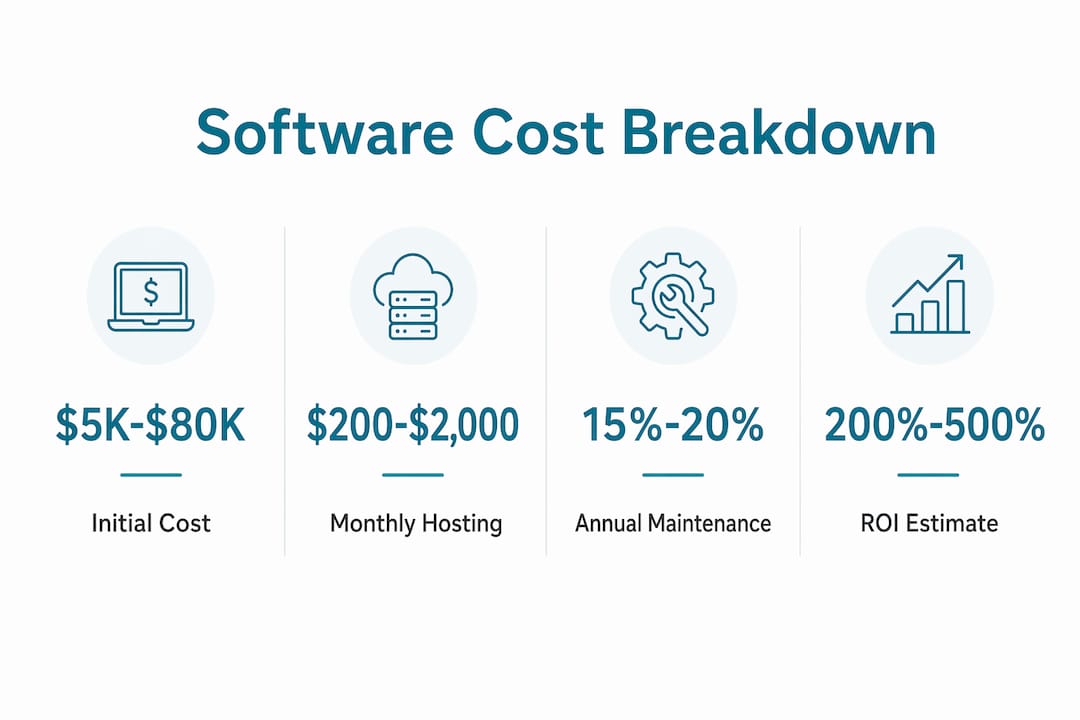
Ongoing costs are where contractors frequently underestimate their software expense per position. Annual maintenance runs 15%–20% of the initial cost. A $20,000 platform carries $3,000–$4,000 in annual maintenance fees. Cloud hosting and infrastructure add another $200–$2,000 per month depending on crew size and data volume.
| Software tier | Typical initial cost | Annual maintenance | Monthly hosting |
|---|---|---|---|
| Entry-level field apps | $5,000–$15,000 | $750–$3,000 | $200–$500 |
| Mid-range platforms | $15,000–$40,000 | $2,250–$8,000 | $500–$1,200 |
| Enterprise platforms | $40,000–$80,000+ | $6,000–$16,000+ | $1,200–$2,000+ |
These costs belong in your overhead calculation. A contractor running 500 jobs per year on a mid-range platform paying $6,000 annually in maintenance and $800 per month in hosting carries roughly $31.20 in software overhead per job. That number needs to appear in every quote.
Software investments can yield 200%–500% ROI over 3–5 years when managed with clear requirements. The risk is scope creep, which can increase costs by 30%–60%. Contractors who add features mid-implementation without adjusting their overhead rate end up with a cost per job figure that no longer reflects reality.
Pro Tip: Review your software overhead allocation every quarter. If your platform costs change due to new users, add-ons, or hosting upgrades, update the predetermined rate before it distorts your job pricing.
Check the field service platform pricing models guide for a breakdown of how different pricing structures affect your per-job calculations across crew sizes.
How do you use cost per job data to price work and grow profitably?
Accurate cost per job data is only useful if you act on it consistently. Contractors who track costs but never reconcile them are collecting numbers without gaining insight. The goal is to build a feedback loop where every completed job improves the next estimate.
Tracking at the small-unit level, meaning every hour and every material item, is the defining factor of profitable contracting operations. Businesses that track this way build a cost database that makes future estimates faster and more accurate.
Best practices for using cost per job data effectively:
- Track costs daily, not weekly. Waiting until Friday to log Tuesday's materials creates gaps. Real-time entry keeps the cost sheet accurate.
- Run reconciliation checks after every job. Regular reconciliation at the end of each job confirms that costs are correctly allocated and that profitability is not an illusion created by misposted expenses.
- Set markups based on verified cost data. A 35% markup on a job you have not fully costed is a guess. A 35% markup on a fully costed job is a decision.
- Identify loss-making job types. Sort completed jobs by margin. If every drain cleaning job loses money, you need to reprice or stop taking them.
- Use historical data to refine estimates. After 50 similar jobs, your average cost is a reliable benchmark. Use it to set standard estimates and reduce quoting time.
Relying on job costing instead of educated guessing is the defining factor between contractors who scale and those who stay stuck at the same revenue level. The data tells you which jobs to pursue, which to reprice, and which to decline.
Avoiding software overspending mistakes is part of keeping your overhead allocation honest. If your software costs grow faster than your job volume, your cost per job rises without any change in field operations.
Key Takeaways
Accurate software cost per job calculation requires tracking direct materials, direct labor, and allocated overhead for every job, then reconciling those figures consistently.
| Point | Details |
|---|---|
| Core formula | Divide total direct materials, labor, and overhead by the number of jobs completed. |
| Software as overhead | Field service software subscriptions must be allocated per job using a predetermined rate. |
| Ongoing cost budgeting | Budget 15%–20% of initial software cost annually for maintenance, plus $200–$2,000 monthly for hosting. |
| Reconciliation discipline | Run cost checks after every job to catch misallocated expenses before they distort margins. |
| Data-driven pricing | Use verified cost per job figures to set markups, not estimates or industry averages. |
What most contractors get wrong about job costing
I have reviewed cost structures for dozens of field service operations, and the same mistake appears repeatedly. Contractors calculate direct materials and labor accurately, then treat overhead as a rounding error. That gap is where margin disappears.
Software subscriptions are the most commonly missed overhead item. A contractor paying $800 per month for dispatch and scheduling tools across 300 jobs carries $2.67 per job in software overhead. That sounds trivial until you realize it compounds with vehicle costs, admin time, and utilities into an overhead burden that can exceed $40 per job on a lean operation.
The second issue is scope creep in software itself. When contractors add users, modules, or integrations mid-year without updating their overhead rate, the cost per job figure becomes stale. I have seen operations quoting jobs at a 30% margin while actually running at 18%, simply because the overhead rate had not been updated in two years.
The fix is not complicated. Set a calendar reminder every quarter to recalculate your predetermined overhead rate. Pull your actual software costs, hosting fees, and maintenance invoices. Divide by projected labor hours. Update the rate in your job costing software. That 20-minute task protects every quote you send for the next 90 days.
Accurate small-unit tracking is the defining factor of service operations with healthy cash flow. The contractors who do this consistently are the ones who can afford to be selective about which jobs they take.
— Blake
How Ampleexpress helps you track software cost per job
Ampleexpress gives field service contractors a ranked shortlist of over 30 software options, each evaluated for pricing transparency, rollout risk, and fit for your crew size. The platform covers HVAC, plumbing, electrical, and pest control operations, with regional pricing benchmarks built in so you know what software actually costs in your market.
Use the software cost calculator to estimate your total software overhead per job before you commit to any platform. Then browse field service software by trade to find options matched to your specific operation. Ampleexpress does not sell software. It helps you choose the right one without the vendor pressure.
FAQ
What is the formula for software cost per job?
The formula is (Direct materials + Direct labor + Applied overhead) ÷ Number of jobs. Software subscription costs are included in the overhead component and allocated using a predetermined rate per labor hour or per job.
How much should I budget for field service software annually?
Budget 15%–20% of the initial software cost for annual maintenance, plus $200–$2,000 per month for cloud hosting depending on your crew size and data volume.
What overhead costs belong in a job costing calculation?
Overhead includes utilities, rent, vehicle depreciation, admin staff time, and software subscriptions. All indirect costs that support operations but cannot be tied to a single job belong in the overhead pool.
How often should I update my overhead allocation rate?
Update your predetermined overhead rate at least quarterly. If your software costs, crew size, or job volume changes significantly, recalculate immediately to keep your cost per job figures accurate.
Why do contractors underprice jobs even with job costing software?
The most common cause is failing to include all overhead costs in the allocation rate. Software subscriptions, maintenance fees, and hosting charges are frequently omitted, which causes the cost per job figure to understate true expenses.
Recommended
- Pest Control field service software
- Get a Pest Control software shortlist
- Contractor Management Software: A 2026 Field Guide
- Field Service Software Cost Calculator (2026) | Ample Express
- Contractor Software Selection Checklist for 2026 | Ample Express
- Contractor Operations Software Best Practices: 2026 Guide